iMessage, free on every plan
iMessage your leads from your own number. Completely free.
Connect a Mac that's signed in to Messages and your CRM texts from your real iPhone number: blue bubbles, audio messages, photos, read receipts and tapbacks. Add every teammate's number, run several numbers on one Mac, or let one number text for several of your businesses. No fee per number and no credits per iMessage.
Watch it work23 secFree on every plan, as many numbers as you connect. Now in beta.



Loved by 1,300+ businesses
How it works
Set up in about five minutes
- 01
Get a code
In Settings → Phone → iMessage, download the Mac app and get a one-time connection code.
- 02
Pair a Mac
Open the Mac app on a Mac signed in to Messages with your iPhone's number, type the code and follow the checklist until it's all green.
- 03
Text from the CRM
Pick iMessage or SMS on any message. Replies land in the same thread, and automations and AI replies send through your number too.
Blue bubbles
Your customers see your name, not a number they don't know.
Texts go out from the iPhone number your customers already have saved, so they show up as you, in blue. Record an audio message in the CRM and it plays like one sent from an iPhone. Voice memos customers send are transcribed, so you can read them and the AI can answer. Photos go both ways, you see Delivered and Read, and replies you type on the iPhone show up in the CRM too.
- Audio messages recorded right in the CRM
- Voice memos transcribed for you and the AI
- Photos, read receipts and tapbacks
Unlimited numbers
Every teammate's own number, free.
Each team member can connect their own iPhone number, as many as you have. An admin chooses who may text from each number, the inbox filters by number, and every message shows who sent it and from which number, with the Activity Log keeping the record.
- Unlimited numbers, $0 each
- Choose who can text from each number
- Filter the inbox by number
One Mac, many numbers
One Mac runs several numbers. One number can serve several businesses.
Each number is its own user on the Mac, signed in to Messages. Switch users and the others keep sending and receiving in the background; in our tests replies reached the CRM in a second or two. Plan on 4 to 6 numbers per Mac with 16 GB of memory or more. And one number can text for several of your sub-accounts: each business connects with its own code, and a text goes to the business whose CRM has that person.
- 4 to 6 numbers per Mac with 16 GB+
- One number, several sub-accounts
- Keeps the Mac awake and opens at login
AI and automations
iMessage everywhere you text a lead.
Each number has its own AI on or off. Automations can Send as iMessage from the number you pick, scheduled messages keep iMessage, and Meta Instant Form leads can get their first text from an iMessage number, with your business number as the fallback. STOP, quiet hours and hand-offs work exactly as they do for SMS.
- AI replies, on or off per number
- Send as iMessage in automations
- Meta lead forms can send from an iMessage number
Free
Other iMessage services charge for every number. Here it's free.
Hosted iMessage providers charge about $100 to $300 a number every month, and apps that use your own Mac still charge $19 to $39 a month a number or an account. On Zuops, iMessage comes with every plan: no fee per number, no credits per iMessage sent or received, and as many numbers as you connect.
- No fee per number, ever
- No credits per iMessage sent or received
- Every plan, from $19/mo
Keeps your number safe
Paced so your number doesn't get flagged.
Apple doesn't publish a limit, and numbers that text too many strangers get reported as junk. So each number starts at 30 new conversations a day for its first two weeks, then 50, no more than 6 an hour, and a first text stays short and plain. Replies, and people who text you first, never count. Bulk texts never go through iMessage, and STOP works the same.
- 30 new a day for two weeks, then 50
- Replies always unlimited
- Bulk texts never sent as iMessage
See it in action
See iMessage in action.
Recorded inside Zuops with a demo business. Nothing here is a mockup.
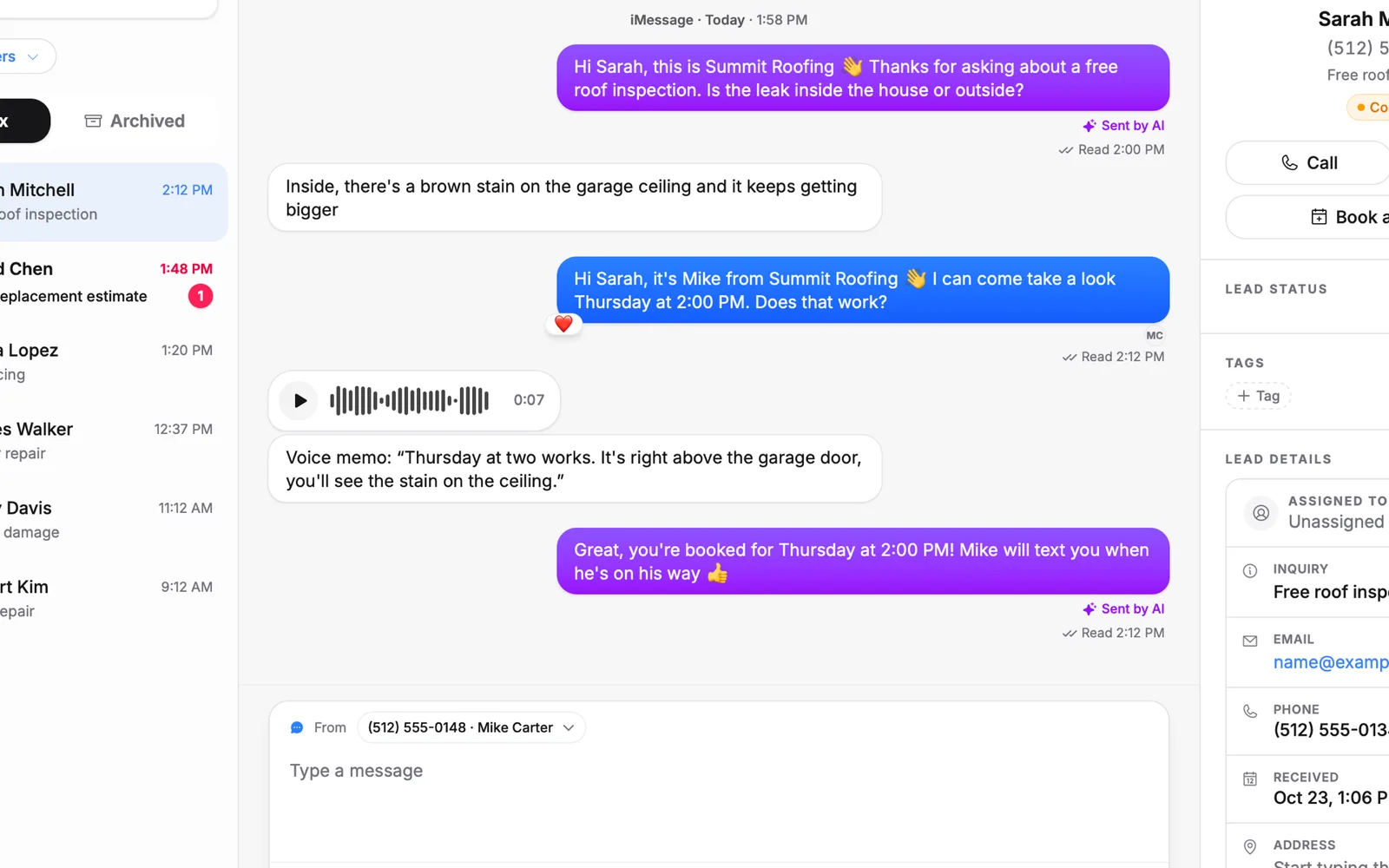
1/5 Text from your own iPhone number
Why iMessage
Everything iMessage, none of the per-number bills.
Completely free
No fee per number and no credits per iMessage, sent or received, on every plan.
Unlimited numbers
Every teammate's iPhone number, several per Mac, and one number for several businesses.
Audio messages
Record in the CRM and it plays like an iPhone audio message. Voice memos you get are transcribed.
Green when it has to be
People without iMessage, or who text your iPhone by SMS, get a regular text from the same number.
AI and automations
AI replies per number, Send as iMessage in automations, scheduled texts and Meta lead forms.
White-label
The CRM and the Mac app carry your agency's name for every client.
Pricing
iMessage is free on every plan: unlimited numbers, no credits per iMessage.
Every plan includes the whole platform. Usage comes out of your plan's monthly credits.
See plans and credit pricesHow much does iMessage cost on Zuops?
Nothing. It comes with every plan (from $19/mo): no fee per number, as many numbers as you connect, and iMessages sent or received use no credits.
Do I need a Mac?
Yes. iMessage only runs on Apple devices, so each number is a user on a Mac (macOS 14 or later) signed in to Messages with that iPhone's number. One Mac can run several numbers. A Mac mini that stays plugged in is ideal; a MacBook has to keep its lid open.
Can one Mac run several numbers?
Yes. Each number is its own user on the Mac, signed in to that number's Apple ID. When you switch users, the others keep sending and receiving in the background, and each number keeps its own daily limit. Plan on 4 to 6 numbers per Mac with 16 GB of memory or more. If Apple blocks a Mac for spam, every number on it stops, so pace new conversations.
Can one number text for several businesses?
Yes. Each sub-account connects to the same Mac with its own code. A text goes to the business whose CRM has that person, otherwise the one that texted them last. The number's daily limit is shared between them.
Does my iPhone have to stay on?
Not for iMessages: the Mac sends them on its own. Green texts from your iPhone's number go through the iPhone, so for those it needs to be on, with Text Message Forwarding turned on for the Mac.
How many iMessages can I send a day?
Replies, and texts people send you, are unlimited. Each number can start 30 new conversations a day for its first two weeks, then 50, and 6 an hour, so it isn't flagged as spam. Bulk texts never go through iMessage. Add numbers to reach more people.
What if a lead doesn't have an iPhone?
The Mac finds out within seconds and the text goes out as a regular text instead, from your business number or your iPhone, whichever the number is set to use. Someone who texts your iPhone by SMS gets the answer from that same iPhone.
Can I send audio messages?
Yes. Record one in the CRM's composer and it arrives like an audio message from an iPhone. Voice memos customers send play in the thread and are transcribed, so the AI can answer them too.
Can the AI reply by iMessage?
Yes, with AI on or off for each number. Automations, appointment reminders, scheduled messages and Meta lead-form follow-ups send through it too, and replies land in the same thread.
Can I see which teammate sent a message?
Yes. Every iMessage shows the person and the number it went from, the inbox filters by number, and sends are kept in the Activity Log. An admin chooses who may text from each number.
Can I use it through the API?
Yes. GET and PATCH /v1/imessage/lines list your numbers and change their settings, POST /v1/messages takes send_as to send as iMessage, and the MCP server has a manage_imessage tool.
Why does my Mac say it can't check the app?
While iMessage is in beta, the Mac app isn't signed by Apple yet. The first time you open it, go to System Settings → Privacy & Security and click Open Anyway. You only do this once.
Will my personal texts show up in the CRM?
No. By default the Mac only syncs one-to-one conversations with people already in your CRM. Group chats and everyone else stay on the Mac.
Is this Apple Messages for Business?
No. Apple Messages for Business is Apple's program for brands, reached from Apple Maps or a website button, and the customer has to write first. This is your own iPhone number texting your own customers, the way you already do from your phone.
Free iMessage from your own numbers.
Connect a Mac in about five minutes and every lead gets your real number, in blue. Add every teammate's number, free.
- Unlimited numbers, free
- Plans from $19/mo
- Cancel anytime