Automations, in every plan
Follow-up that runs itself.
Pick what starts it (a new lead, a Facebook form, a booking, a reply) and what happens next: texts, emails, waits, if/else paths, tags and alerts to your team. Describe it in plain words and the AI builds it, or start from 30+ templates. You check every step before anything goes out.
Watch it work26 secIn every plan, from $19/mo. Building and running automations is free; the texts and emails they send use your usual credits.



Loved by 1,300+ businesses
How it works
From an idea to a running automation
- 01
Pick what starts it
A new lead, a Facebook Lead Form, a Smart Form, a booking, a tag, a stage change, a reply, a custom field, or another tool posting to your private webhook.
- 02
Add the steps
Texts, emails, waits, if/else paths, drips, tags, stage moves and team alerts. Or type it in a sentence and the AI lays the steps out for you.
- 03
Turn it on and watch
Every step shows how many leads entered, finished, skipped or failed, and you can see who's in it right now and take anyone out.
Built by AI
Describe it in plain words. The AI builds the steps.
Type what should happen and when, the way you'd tell a new hire. The AI picks the trigger, writes short, friendly texts and emails, and uses your own pipeline stages, calendars, custom fields and email senders. It opens as a draft on the canvas, so you read every step before you save it. Moving from another CRM? Drop in a screenshot of an old workflow and it builds it again here.
- Type it, or drop in up to 3 screenshots
- 30+ templates if you'd rather start from one
- An AI copilot that edits or explains it
Triggers and steps
Starts on anything that happens in your CRM.
A new lead, a Facebook Lead Form (any page, or just the forms you pick), a Smart Form, someone filling in a form again, a tag, a stage change, a booking or cancellation on the calendars you pick, a reply that mentions words like “call”, or a custom field changing. Then it texts, emails, waits, splits into paths, tags, moves the stage, assigns an owner, pauses the AI, alerts your team by text, email or app, or sends the lead to another tool.
Timing
Waits that follow the appointment. Drips that pace your team.
Wait minutes, hours or days, only during business hours, or until a time of day. Set a reminder for 24 hours before the appointment and it moves when the appointment moves; if the appointment is cancelled, the text is dropped unless they booked a new time. A Drip step lets only so many leads through at once, like 5 a day, so a list of old leads turns into replies your team can keep up with.
- Before or after the appointment, and it follows changes
- Drip at 5 a day, 10 an hour or any pace
- Business hours, quiet hours and a sending window
Results
See every step's numbers, and who's in it right now.
Turn on Stats view and every card on the canvas shows how many leads entered, finished, were skipped or failed in the last 7, 30 or 90 days, and how many took each path. Open the leads in it to see who's waiting at which step and take anyone out, which cancels everything still queued for them. Your last 20 saves are kept, so you can look at an old version and restore it.
- Entered, done, skipped and failed per step
- Take a lead out and nothing else sends
- Last 20 versions kept, restored in one click
Built-in guard rails
Rules that keep it from texting the wrong person
Every automation has its own settings for who goes through it and when. They start on safe defaults, and you can change each one.
- Each lead goes through an automation once unless you allow it again, with a cooldown you set, and never more than 5 times in 24 hours (a safety cap you can change).
- Stop when the lead replies, or set a goal like They book or Marked won. It's checked before every step, so nobody gets a nudge after they've said yes.
- Send only inside the hours and days you pick, and respect your quiet hours so nothing lands at 3 AM.
- People who replied STOP or have a bad number are skipped.
- Adding leads already in your CRM: up to 25 start right away, bigger lists start in the background at up to 300 new people a day.
- Test workflow runs it on a lead without sending a text, email or alert, and Preview run shows the path a real lead would take.
See it in action
See Automations in action.
Recorded inside Zuops with a demo business. Nothing here is a mockup.
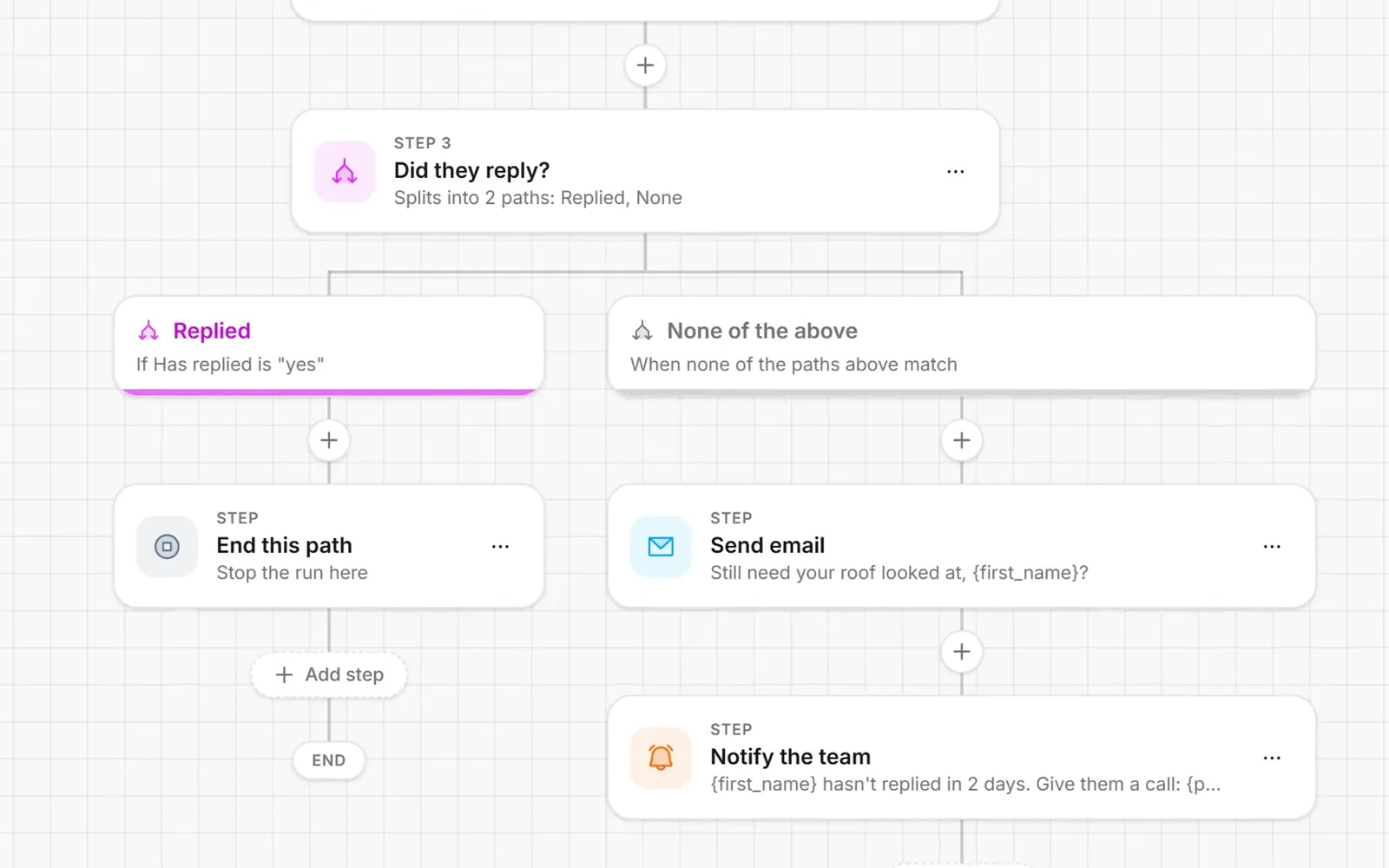
1/4 Describe it in a sentence
Why Automations
The follow-up nobody forgets.
Built from a sentence
Say what should happen and the AI builds the trigger, the steps and the messages for you to check.
30+ templates to start from
Speed to lead, appointment reminders, review asks and old-lead wake-ups. Each stays off until you turn it on.
Paths for every answer
Split on replied, booked, tags, stage, custom fields or anything about the lead, with paths inside paths.
Stops when they answer
End the run on a reply or a goal like They book, so nobody is chased after they've said yes.
Paced, never blasted
Drip steps, business hours, quiet hours and a sending window keep texts at a pace your team can answer.
Talks to your other tools
An inbound webhook starts it from Zapier, Make or any form, and an outbound webhook sends the lead anywhere.
Pricing
In every plan, free to build and run. A text it sends is 0.125 credits, an email 0.03.
Every plan includes the whole platform. Usage comes out of your plan's monthly credits.
See plans and credit pricesFAQ
Automations: common questions
The basics
What can an automation do?
It starts when something happens in your CRM: a new lead, a Facebook Lead Form, a Smart Form, a lead filling in a form again, a tag, a stage or status change, a booking or cancellation, a reply, a custom field changing, or another tool posting to your private webhook. Then it runs your steps: text or email the lead (or let the AI write the message), wait, split into paths, drip leads through a few at a time, tag, move the stage, assign an owner, add a note, pause the AI, stop follow-ups, alert your team, or send the lead to another tool.
What do automations cost?
Nothing to build or run, on every plan from $19/mo, and the AI builder and copilot are free too. You only pay for what they send, from your plan's credits like any other message: 0.125 credits a text (per 160 characters; 0.25 with a picture) and 0.03 an email. An alert to your team by text costs the same as a text; app alerts, waits, tags, notes, stage moves and webhooks cost nothing.
Can the AI build an automation for me?
Yes. On the Automations page, type what should happen and when, like “When a Facebook lead comes in, text them. If they haven't replied in 2 days, email them and text Mike.” You can also drop in up to 3 screenshots of a workflow from another tool. The AI builds the trigger, steps and messages from your own stages, calendars, custom fields and email senders, and opens it in the editor for you to check before you save. Inside the editor, the AI copilot changes it on request or explains what it does and why steps fail.
Building
How do if/else paths work?
Add an If / else step and pick when each path is taken: They replied, They booked, Hot / urgent lead, We have an email, Marked won or Nobody owns it yet, or build your own rule on any lead field, tag or custom field (all of them must match, or any one). Leads who match no path take “None of the above”. A path can hold its own split, and the paths can end or join back up for the steps after them.
Will a reminder move if the appointment moves?
Yes. A wait set to a time before or after the appointment is timed against the booking itself. Move the appointment and the reminder moves with it. If it's cancelled and the lead booked a new time, the reminder follows the new one; if not, the rest of the run is skipped, so nobody gets a reminder for an appointment that's gone.
What does a Drip step do?
It lets only so many leads through to the next step in a set time, like 5 a day or 10 an hour. The first ones go straight through; everyone after waits in line in the order they came in. New rounds only start in your texting hours, so leads never pile up overnight, and a lead who leaves while waiting (they replied or you took them out) frees their place. It's how you text a list of old leads without burying your team in replies.
Can it connect to my other tools?
Yes, both ways. Each automation with the Inbound webhook trigger gets a private web address: when Zapier, Make, a website form or another CRM posts to it, it finds the person by phone or email, or adds them as a new lead, and every field it sent can go in your messages (say, {project}). The Send outbound webhook step sends the lead to any https address, with your own headers and extra fields.
Running
How do I stop someone from getting the rest of the steps?
Turn on Stop when the lead replies, or set a goal like They book, and the run ends as soon as it's true. You can also open the leads in an automation and take one person, a few or everyone out, which cancels everything still queued for them. People who replied STOP are skipped.
Can I test an automation before it goes live?
Yes. Test workflow runs it on a lead from your CRM, skipping the waits and sending no texts, emails or alerts, and you can read each step in the Execution logs. Preview run shows the path a real lead would take and the messages they'd get. Templates open turned off, and you can add leads who are already in your CRM whenever you're ready.
Still have a question?
Ask us. You get an answer in about a minute, and a person from the team takes over when needed.
Ask our teamEvery lead followed up, the same way, every time.
Describe your first automation or start from a template. It's in every plan, from $19/mo.
- 30+ templates
- Plans from $19/mo
- Cancel anytime