Client support desk
A help desk for every client. Your AI answers first.
Every client gets a Support page in their CRM, with your name on it. Your assistant answers from the CRM's own help, their live setup and what you teach it, and reads their ad numbers when they ask about ads. What it can't solve lands on your Support desk with a brief and a reply ready to send.
Watch it work24 secIncluded on every plan, from $19/mo. Your assistant's answers use no credits.



Loved by 1,300+ businesses
How it works
Answered first by your AI. Finished by your team.
- 01
A client opens a ticket
From Support in their CRM: pick a topic, write a line, add a screenshot or the ad they mean. Your team's replies reach them by email too.
- 02
Your assistant answers first
Usually within a couple of minutes, from every page of the CRM, their own setup and your notes. Ad questions start with their last 7 days of numbers.
- 03
Your team takes the rest
Billing, bugs, ad work and anyone who asks for a person go to one teammate, with a brief, a priority and a reply ready to send.
Under your brand
Clients ask in their own CRM. It answers from their account.
The Support page sits in every sub-account's menu, in your brand. Your assistant knows every page and setting of the CRM by name and reads the client's live setup: phone numbers and text registration, AI texting, calendars, automations, forms and connections. So when bookings don't reach Google Calendar, it sees the calendar isn't connected and gives them the two clicks that fix it. It answers in the language they wrote in and reads their screenshots.
- Exact menu names, with a button to the page
- Reads their setup and their screenshots
- Talk to a person, any time
Ads & campaigns
Asked about their ads? It reads the numbers first.
When a client asks why leads slowed down or cost more, the assistant opens their ad account before it answers: the last 7 days against the 7 before, with cost per lead, leads, spend and how often people saw each ad. It tells the client what changed in plain words, promises nothing, and hands your team the diagnosis: which ad is worn out, a pause right from the ticket, and a button to the Ad Copier for fresh versions.
- Last 7 days vs the 7 before, ad by ad
- Pause a worn-out ad from the ticket
- Clients can send the ad they want run or copied


Your Support desk
Every hand-over arrives with a reply ready to send.
Tickets your assistant can't finish land on your Support desk. Each one opens on what the client wrote, with the suggested reply under it: one click puts it in the box to check and send. Folded under that is what it found: a one-line summary, how urgent it is, how the client sounds, the steps to take with a link to the right page or tool, and questions to ask. Anything it can't know is marked [check: …], and the reply can't go out until you fill it in.
- A suggested reply on every hand-over
- Priority, mood and steps to take
- Internal notes and saved answers
Assignments
The right teammate hears about it. Nobody else does.
Give each sub-account its account manager, or share tickets between teammates so whoever has the fewest open gets the next one. Only the assignee gets the push and the email, which carries the brief, the ad numbers and the suggested reply, with a link that opens the ticket with that reply already in the box. Urgent tickets sort to the top, and a wait turns amber after 4 hours and red after a day.
- A person per sub-account, or shared fairly
- Email and push to the assignee only
- Urgent first, then whoever has waited longest
Setting it up
Live for every client from day one
Every sub-account has a Support page from the start, answered by an assistant called Sage. These settings are worth a few minutes, all in Agency → Support desk.
- 1
Name your assistant
Settings → AI assistant: give it your own name, and rules for tone, what to always or never say and when to hand over.
- 2
Teach it what only you know
Knowledge: notes and answers for your prices, policies and how you work. They win over everything else, and a test box shows how it would answer.
- 3
Pick who handles what
Settings → Who handles which tickets: a teammate for each sub-account, or tickets shared between the people you pick.
- 4
Choose who hears about the rest
Settings → Who hears about tickets: everyone on your team or only the people you pick, plus up to 5 other email addresses.
- 5
Send from your own domain
Support email: clients get mail from a shared support address with your agency's name, or from support@ your own domain once it's verified.
- 6
Set the common questions
Settings → Common questions: the starters your clients tap on their Support page. Settings → Support pages switches the page off for any sub-account.
See it in action
See Client Support Desk in action.
Recorded inside Zuops with a demo business. Nothing here is a mockup.
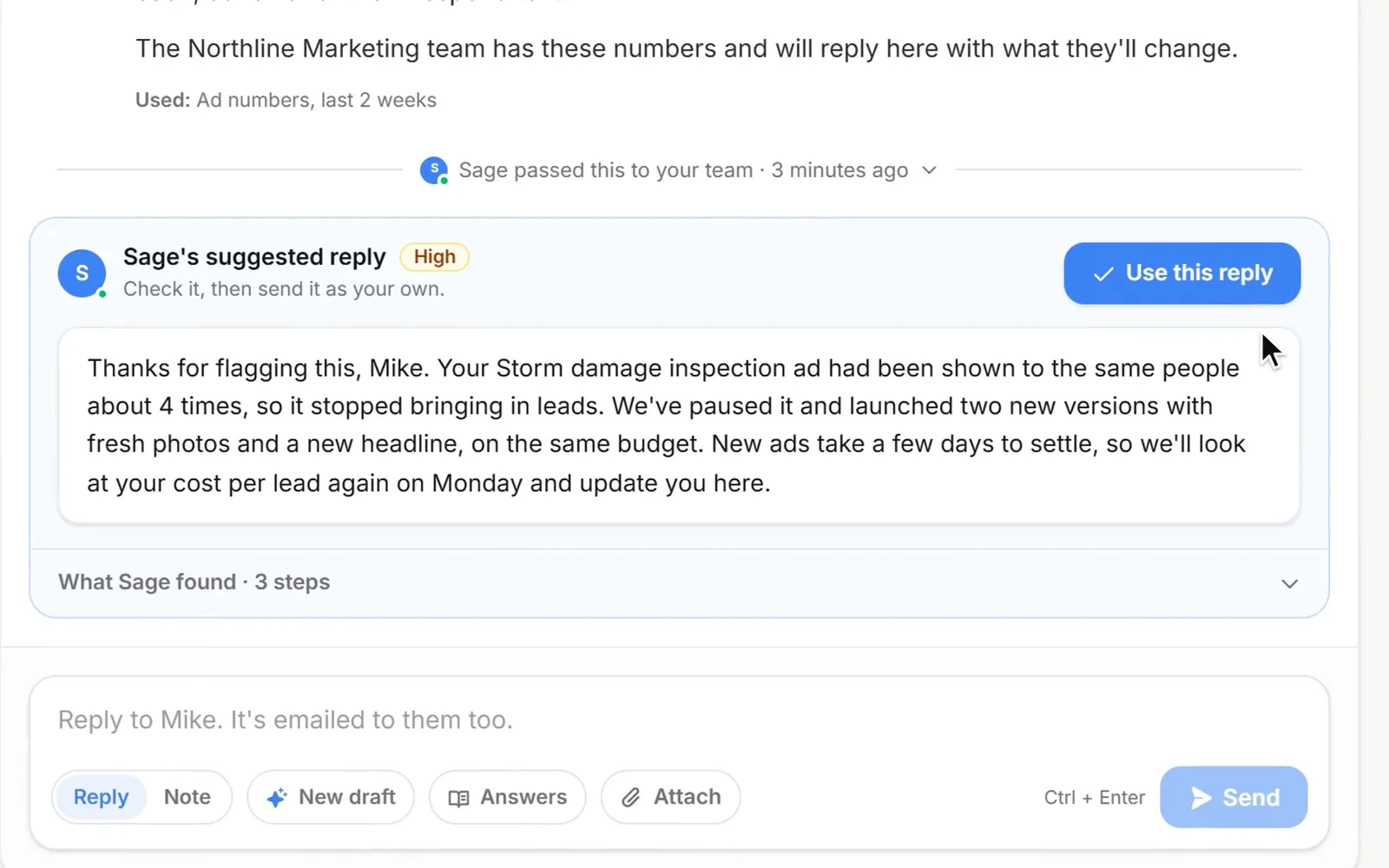
1/4 A client asks about their ads
Why Client Support Desk
Answers for your clients. Briefs for your team.
On for every client
Every sub-account gets a Support page, new ones too. Turn it off for one client or for all of them.
Only your name
The assistant carries the name you give it, and never mentions Zuops or any company or AI behind the CRM.
No credits to run
Its answers, its briefs for your team and its reads of the ad numbers use no credits, on every plan.
Learns your answers
Save a reply as an answer and it handles the next one itself. Your notes win over everything it knows.
Email both ways
Your team's replies are emailed to the client, and when they answer the email it lands on the same ticket.
Files welcome
Screenshots, ads, videos and PDFs, up to 10 a message. It reads screenshots, and Recreate opens a client's ad in the Ad Copier.
Pricing
The support desk comes with every plan, from $19/mo, and its AI answers use no credits.
Every plan includes the whole platform. Usage comes out of your plan's monthly credits.
See plans and credit pricesFAQ
Client Support Desk: common questions
Cost and setup
What does the support desk cost?
Nothing extra. It's part of every Zuops plan, from $19/mo, and the assistant's answers, briefs and reads of the ad numbers use no credits. Plans differ only in how many sub-accounts you get: 1 on Access, 5 on Growth, unlimited from Scale at $99/mo.
Do I have to set anything up?
No. Every sub-account has a Support page from the start, answered by an assistant called Sage. Most agencies spend a few minutes renaming it, adding their prices and policies in Knowledge and choosing who handles tickets.
Can I turn it off for a client?
Yes. Support desk → Settings → Support pages turns the page off for one sub-account or for all of them. You can also switch the assistant off, so every ticket goes straight to your team.
The AI assistant
What does the assistant know?
Every page and setting of the CRM by its exact name, updated with every release. The client's live setup: phone numbers and text registration, AI texting, calendars, automations, forms and connections. Who is asking: an Admin gets the settings steps, Staff and Technicians are told to ask their admin. And everything you add in Knowledge, which wins over the rest. It answers in the language the client writes in.
When does it hand a ticket to my team?
Whenever it can't fully help: prices, invoices and refunds (unless your own answers cover them), bugs it can't explain, anything only you can switch on or change, work you do for them like ads, budgets and offers, feature requests, privacy or legal questions, anyone who asks for a person or sounds upset, and anything it would have to guess. A person also takes over after 6 answers on one ticket, and the client can press Talk to a person at any time.
Will my clients see Zuops?
No. The Support page is part of your white-label CRM, the assistant has the name you choose, and it never names Zuops or any company or AI model behind the CRM. Support email comes from a shared support address with your agency's name, or from support@ your own domain.
Your team
Who on my team gets notified?
One person per ticket. Give each sub-account its own teammate, or share tickets between people and whoever has the fewest open gets the next. The assignee gets a push and an email with the brief and a link that opens the ticket with the suggested reply in the box. A ticket nobody is assigned to alerts everyone on your team who works with that client, or only the people you pick, plus up to 5 other email addresses.
Can clients answer by email?
Yes. Your team's replies are emailed to them, and so is an answer from the assistant they haven't opened after a few minutes. When they answer that email, it lands on the same ticket. With your own email domain set up, mail goes out from support@ your domain and replies come back to it.
Can clients send us ads to run or copy?
Yes. They pick Ads & campaigns and add the ad, a screenshot or a link: up to 10 files a message, 250 MB each. On your desk, Recreate opens a file they sent in the Ad Copier, and the assistant's steps link to the Ad Copier, the Ad Generator or Ads Manager. Its look at the numbers needs the sub-account's ad account linked in Ad Insights.
Still have a question?
Ask us. You get an answer in about a minute, and a person from the team takes over when needed.
Ask our teamGive every client a help desk with your name on it.
It's on for every sub-account from the start. Name your assistant, teach it your prices and let it take the first answer.
- On every plan, from $19/mo
- No credits for AI answers
- Cancel anytime