Estimates & invoices
Say the job. Send the estimate. Get paid.
Say the job and the AI writes the estimate from your own price book, Good, Better and Best included. Customers approve it on their phone, then pay the invoice or a deposit by card, straight into your own Stripe, Authorize.net or Whop account.
Watch it work25 secIncluded on every plan. The AI builder is free, a text is 0.125 credits and an email 0.03. Zuops takes no cut of your payments.



Loved by 1,300+ businesses
How it works
From the driveway to a paid deposit
- 01
Say the job
Type it or tap Speak: who it's for, the work and the options. The AI fills in every line with your price book's names and prices.
- 02
Send it
By text, email or both. The customer opens a page with your name and logo, picks an option and approves it with their name.
- 03
Invoice it and get paid
One tap turns the approved option into an invoice. Ask for a deposit or the full amount, and they pay by card from the link.
Built by talking
One sentence becomes a full estimate.
Describe the job the way you'd explain it to the customer. The AI splits it into options and line items, names them the way your price book does and uses your prices. A price you say always wins, and anything it can't price stays at $0, marked in amber, so nothing is guessed. Then change it the same way: “make Best $16,900” or “add a $250 permit to every option”, with Undo if you don't like it.
- Good, Better and Best from one description
- Prices from your price book, never made up
- Change anything by saying it
Approved on their phone
Customers pick an option and approve it themselves.
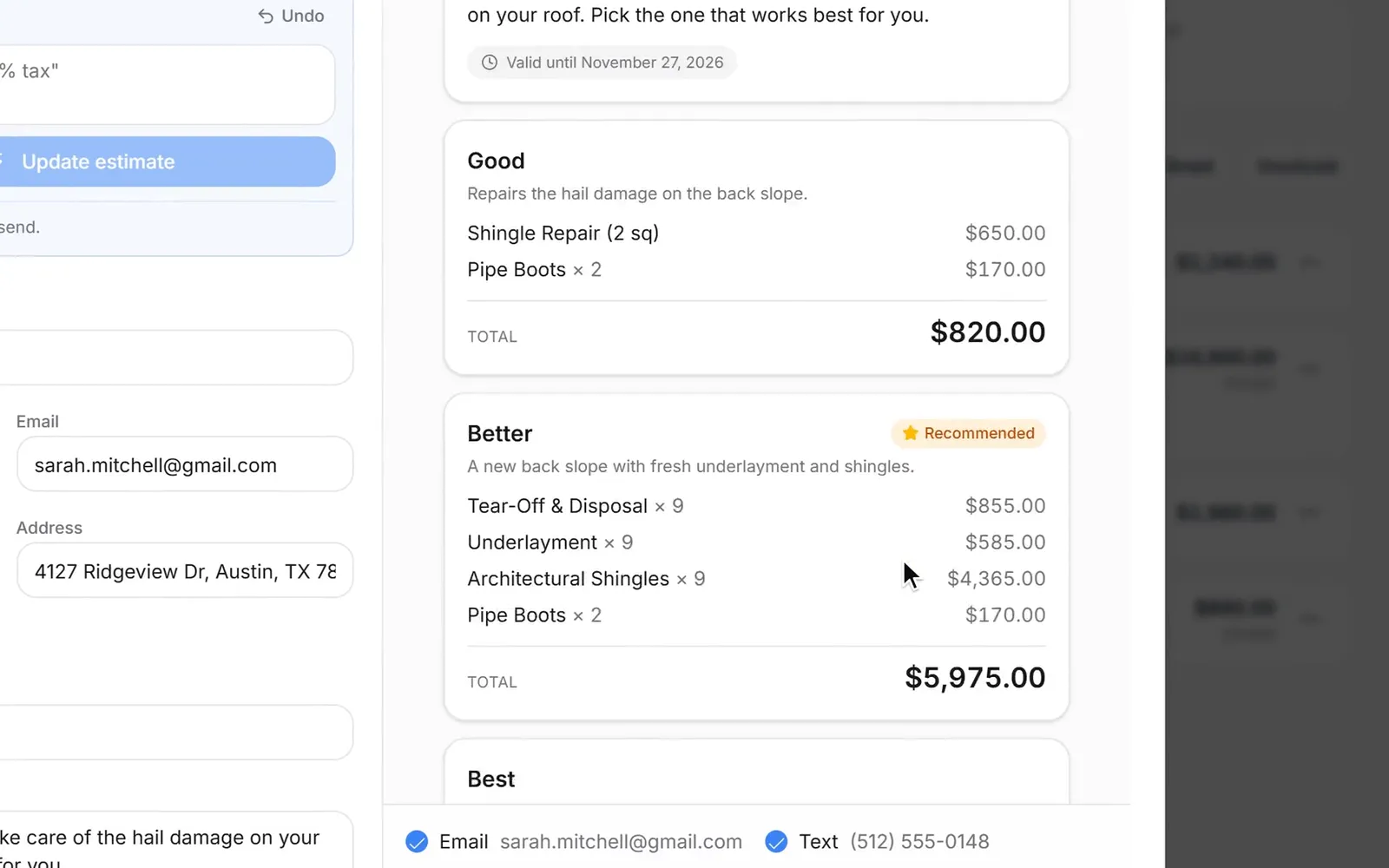
The estimate opens on a page with your name and logo: each option as a card with its photo, items and total, your recommended one marked. They choose, type their name and approve, or tap Not right now and tell you why. Opened, approved and declined all show on the lead's timeline, and approving never charges them anything.
- Photos on every option and line
- A valid-until date, 30 days out unless you change it
- Show it full screen on site, or hand over the PDF
Deposits
Take a deposit now. Bill the balance when the job's done.
Turn an approved estimate into an invoice in one tap and ask for 25%, 50%, any percent or a set amount up front. The customer still sees every item and the job total, and the button reads Pay deposit. Once it's paid, Bill the balance makes the final invoice with the deposit already taken off, and you can change items first if the job changed.
- Every item shown, only the deposit charged
- The final invoice made for you
- Mark cash or check payments paid by hand
Paid to your account
They pay by card. The money goes straight to you.
Connect your own Stripe, Authorize.net or Whop account once in Settings and every invoice can be paid online: Stripe takes cards, Apple Pay and Google Pay. The money lands in your account at your provider's own rates, and Zuops takes no cut. The Invoices page shows what's out, overdue and received, and which customers have opened their invoice.
- Stripe, Authorize.net or Whop, your own account
- No fee from Zuops on any payment
- PDF attached to every invoice email
Before you send your first one
What you need
Estimates and invoices are already in every sub-account, under Invoices. This is everything worth setting up first.
- Any Zuops plan, from $19/mo. Building estimates and invoices with the AI costs nothing.
- Your business address, phone and email in Invoice settings, shown beside your logo on every estimate, invoice and PDF. Numbering, default terms and your tax rate are set there too.
- To be paid online: your own Stripe, Authorize.net or Whop account, connected in Settings → Integrations. Without one you can still send invoices and mark them paid.
- The customer's email for card payments, and their mobile number to text them the link. Both come from the lead.
- Your price book, if you have one. If not, it fills itself: every priced line you save is remembered for next time.
- Owners and admins handle invoices. Staff and technicians can make and send estimates for their own leads from the lead's Estimate button.
See it in action
See Estimates & Invoices in action.
Recorded inside Zuops with a demo business. Nothing here is a mockup.
1/5 Say the job
Why Estimates & Invoices
Quote faster and get paid sooner, without a cut taken.
Built by talking
Say or type the job and the AI writes the lines. It costs nothing, and you check every number before it goes.
Good, Better, Best
Up to five options with photos, one marked as recommended, so customers choose instead of shopping around.
A price book that learns
Every item you bill is remembered, your most used ones are one tap away, and the AI prices from it.
Deposits up front
Ask for part of the job now and bill the balance later, with every item shown both times.
Paid to your own account
Stripe, Authorize.net or Whop, connected once. Zuops never touches the money or takes a cut.
Your name on every page
Estimates, invoices, PDFs and emails carry the business's name and logo, never ours.
Pricing
Estimates and invoices are included on every plan. The AI builder is free; texts are 0.125 credits and emails 0.03.
Every plan includes the whole platform. Usage comes out of your plan's monthly credits.
See plans and credit pricesFAQ
Estimates & Invoices: common questions
Cost
How much do estimates and invoices cost?
They come with every plan, from $19/mo. Building an estimate or invoice with the AI is free. Sending one uses your plan's credits like any message: 0.125 credits a text (per 160 characters) and 0.03 credits an email.
Does Zuops take a percentage of my payments?
No. Customers pay through your own Stripe, Authorize.net or Whop account, so the money goes straight to you at that provider's normal rates. Zuops adds no fee on top.
Estimates
How does the AI build an estimate?
Type or tap Speak and describe the job, like “Sarah Mitchell, hail damage. Repair, replace the back slope, or a whole new roof. Recommend the back slope.” It makes an option for each choice, fills in the lines with your price book's names and prices, writes a short note to the customer and links the lead by name. A price you say wins; anything it can't price stays at $0 and is flagged for you.
Can customers choose between options?
Yes. Give them up to five, like Good, Better and Best, each with its own items, description and photo, and mark one as recommended. They pick one and approve it with their name, or decline and say why. Approving doesn't charge them; you invoice the option they chose.
Can my technicians send estimates?
Yes. Staff and technicians can make and send estimates for the leads they work, from the Estimate button on each lead. A technician only sees estimates for their own leads. Invoices and payment settings stay with owners and admins.
Getting paid
How do customers pay?
Connect your own Stripe, Authorize.net or Whop account in Settings → Integrations and tick “Let them pay by card” when you send. The text and email carry a pay link: Stripe takes cards, Apple Pay and Google Pay, and Authorize.net and Whop open their own secure checkout. The invoice turns Paid when the money comes in. Cash or check? Mark it paid yourself.
How do deposits work?
Turn on Ask for a deposit and pick 25%, 50%, any percent or an amount. The invoice lists every item and the job total, and asks only for the deposit. Once it's paid, Bill the balance makes the final invoice with the same items and the deposit taken off.
More
Can customers sign a contract too?
Yes. Contracts, under Tools, sends agreements and waivers that customers sign on their phone, and the AI can write or change one for you. After signing they can book a call on your calendar.
Can I make estimates through the API?
Yes. POST /v1/estimates makes a draft with options, /send texts or emails it to the lead and /convert turns it into an invoice; invoices and the price book can be read too. The MCP server has an estimates tool, and the CRM's own AI assistant can draft one for you.
Still have a question?
Ask us. You get an answer in about a minute, and a person from the team takes over when needed.
Ask our teamQuote it today. Get paid this week.
Say the job, send the estimate, and let customers approve and pay from their phone, into your own account.
- The AI builder is free
- Plans from $19/mo
- Cancel anytime