Before & after ads and review ads
Turn real job photos and reviews into ads people trust.
Drop in a before and an after photo, or find your business on Google. Zuops lays your real photos and your customers' own words out as ready-to-run ads in feed and story sizes, in your logo and colour. Nothing is drawn or reworded by AI.
Watch it work32 secFree on every plan, no credits. Square, portrait and story PNGs.



Loved by 1,300+ businesses
See it in action
See Before & After Ads in action.
Recorded inside Zuops with a demo business. Nothing here is a mockup.
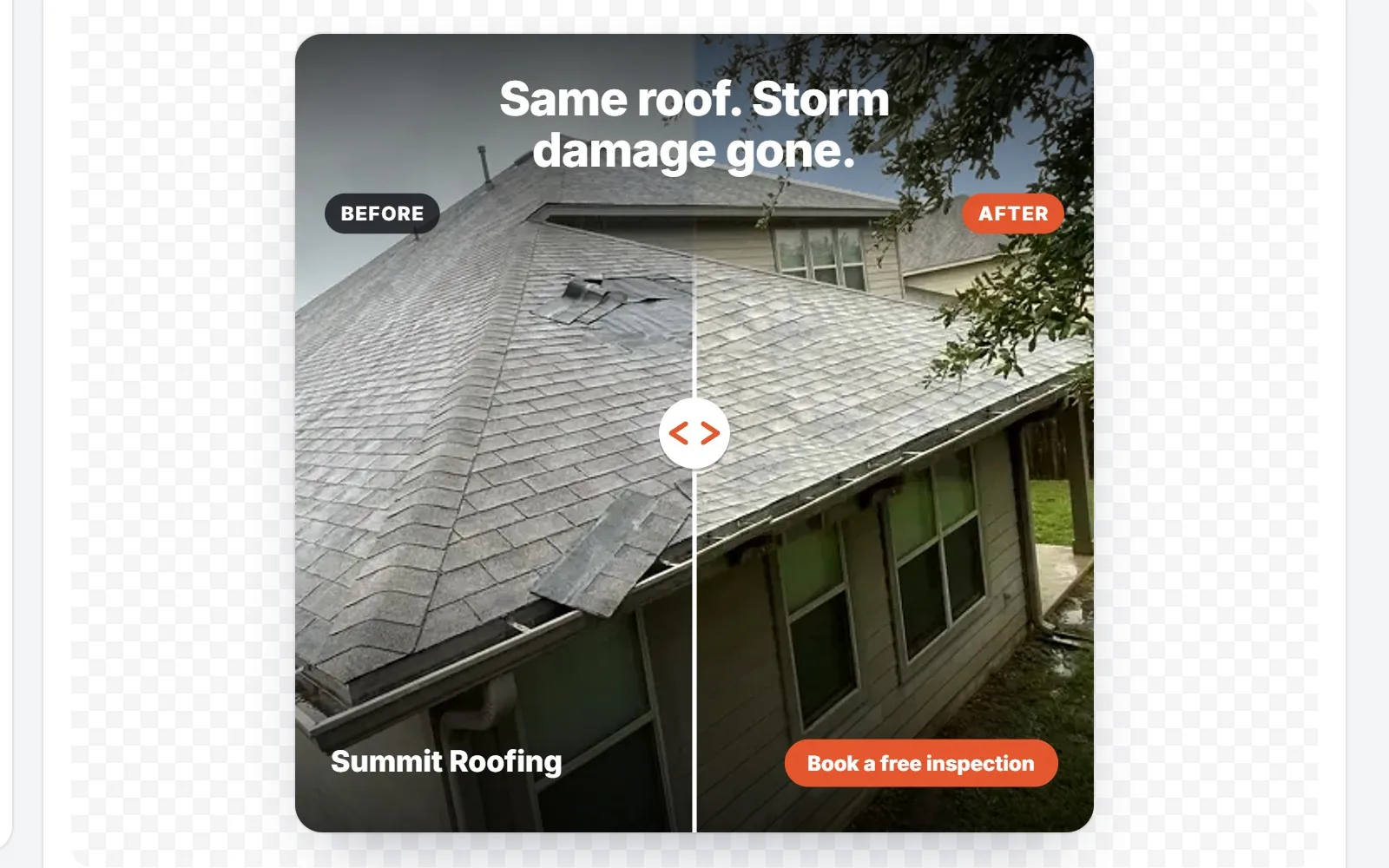
1/5 Drop in your before and after photos
How it works
From proof to a finished ad in three steps
- 01
Add your proof
Two photos of the same spot, before and after the job. Or find your business on Google and your reviews load in, or paste one from anywhere.
- 02
Pick a layout and size
Four layouts for each kind, drawn live as you go. The words are written for you, and every one of them can be changed.
- 03
Download and run it
Square, portrait and story PNGs in your logo and colour, one size or all three at once. Ready for Facebook and Instagram feeds, Stories and Reels.
Before & After Ads
Two photos in. A scroll-stopping ad out.
Drop in a photo of the problem and a photo of your finished work, taken from the same spot. The ad is drawn the moment both are in, and changes as you go. Tap a photo to choose what stays in the frame, zoom in, slide the line, rename the labels.
- Your photos are laid out, never redrawn
- Tap the part of each photo that must stay in the frame
- Before and After labels in your own words
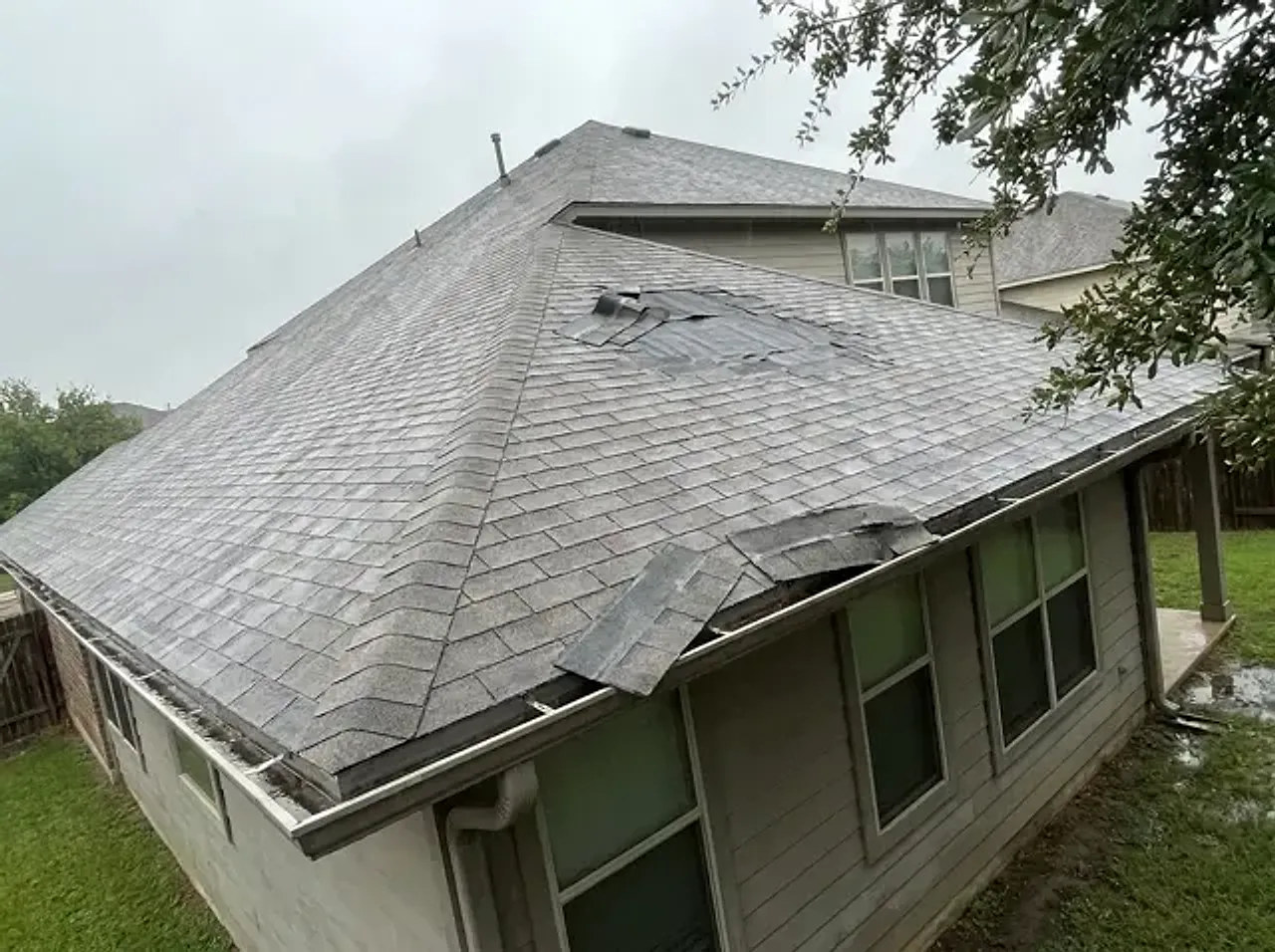
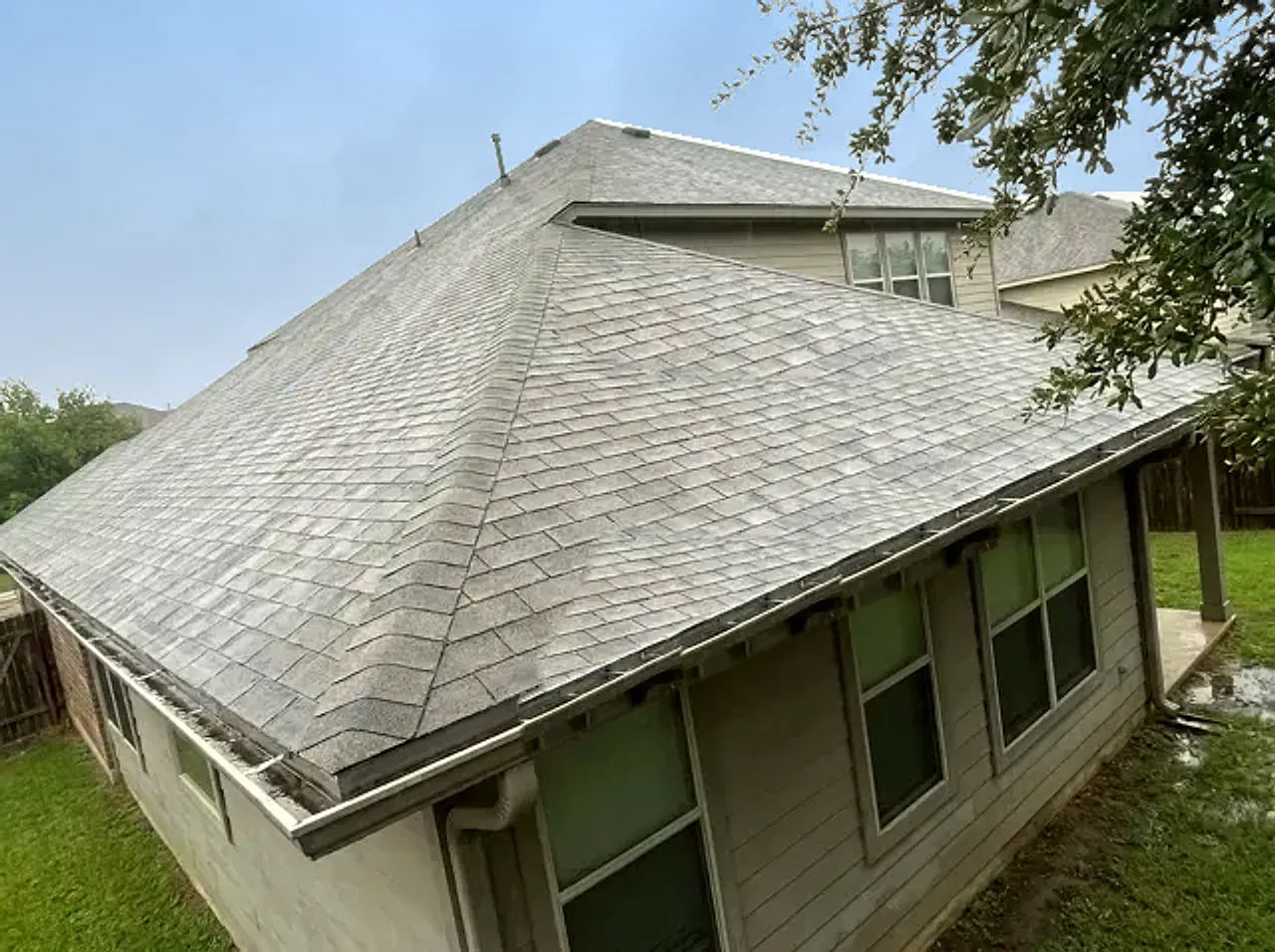
Four layouts
A slider, side by side, top and bottom, or two cards.
Every layout is drawn live from your two photos, so trying one is a single click. The slider wipes the before over the after; the others put both photos in view with your words beside them.
Slider
The after photo, the before wiped in from the left
Side by side
Both photos, your words under them
Top and bottom
Before over after, full width
Two cards
Both photos as cards on your colour
Words written for you
Headlines written from what changed.
Once both photos are in, the AI looks at them and writes headline ideas that name what changed, a line to go under it and button words. It's told never to make up prices, discounts, guarantees, ratings or time frames you didn't give it. Pick one, ask for more, or type your own.
- Five headlines, four lines and four buttons to pick from
- One tap puts an idea on the ad
- Leave a field empty to leave it off
Review Ads
Your best Google reviews, made into ads.
Type your business name and town. The reviews Google shows first load at once, and your best 40 join within a minute or two. The AI marks the strongest ones, the specific and believable reviews that sell, and puts three on the ad. Got a great one on Facebook, Yelp or Nextdoor? Paste it in.
- Strong picks marked, the first three ready to go
- Pick up to three reviews yourself
- Your Google rating, only when Google shows it
Word for word
The customer's own words. Never reworded.
The AI only chooses which sentences to show. Before a pick can reach an ad, the code checks it is the review's own words. Shorten a review by tapping the sentences to leave out, and a … marks the gap. Names show as first name and initial.
- Picks never complain, name staff in full or mention other businesses
- Sentences left out show as …
- The stars the customer gave, as they gave them
Every size
Square, portrait and story sizes in one click.
1080 by 1080 for the feed, 1080 by 1350 for a taller feed post and 1080 by 1920 for Reels and Stories. Story layouts keep your words out of the top and bottom, where Instagram and Facebook put their own buttons. Download one PNG, or all three at once.
Square
1:1 feed · 1080×1080
Portrait
4:5 feed · 1080×1350
Story
9:16 Reels & Stories · 1080×1920
Shaded: where Instagram and Facebook put their own buttons on a story. Your words stay clear of it.
Your brand
Your logo and colour on every ad.
Pick a saved brand or type your name, add your logo and choose your colour. The background can be your colour, dark or light, and the button and labels follow your colour on every layout. It's remembered, so the next ad starts in your brand.
Honest by design
No AI drawing. That's the point.
An AI tool can redraw a roof to look perfect or polish a review until it shines. Then it isn't your proof any more, and people can tell. Here your photos stay your photos, pixel for pixel, and reviews stay word for word. The AI only does the parts where it helps: ideas for your words, and which sentences to show.
For agencies and AI agents
Proof ads for every client, by hand or by API.
Make them from your Zuops dashboard for each client: pick the client's saved brand and its logo and colour come with it. It's free, so they fit in any package. Through the API and the MCP server, an AI agent can find a client's reviews, write the words and get finished PNGs back.
- POST /v1/proof-ads/before-after and /review
- GET /v1/proof-ads/reviews finds a business and reads its reviews
- The proof_ads tool for Claude, ChatGPT and other MCP clients
How to take them
How to take before and after photos that make good ads
The ad can only be as good as the two photos. A few habits on the job make them match.
- 1
Stand in the same spot
Take the before from somewhere you can find again: a corner of the driveway, the edge of the lawn, the doorway. Then take the after from exactly there.
- 2
Hold the phone the same way
Same height, same angle, same zoom. If the before is wide, the after is wide. A slider ad only works when the two line up.
- 3
Show the problem clearly
Get the damage, the stain or the mess in the middle of the frame, in daylight if you can. Close enough to see it, wide enough to know where it is.
- 4
Take the after when it's finished
Tools put away, the area cleaned up. The after photo is your work, so it should look like the job is done.
- 5
Leave people and plates out
Keep faces, house numbers and car plates out of the shot, and ask the customer before you use photos of their home.
- 6
Make the ad the same day
Drop both photos into Before & After Ads while the job is fresh. Every finished job is a new ad.
Why Before & After Ads
Why proof ads work for local businesses.
Proof beats promises
A before and after shows the job, not a claim about it. A review is a neighbor talking, not you.
Free on every plan
No credits for making them, downloading them, or writing their words.
Every size in one click
Square, portrait and story PNGs, ready for feeds, Stories and Reels.
Your photos stay yours
Laid out by code, never redrawn. What people see is the job you did.
Reviews, word for word
The AI picks sentences; it never rewrites them. A … shows where any were left out.
A new ad from every job
Two photos from today's job are tomorrow's ad. Fresh ads, without a designer.
Pricing
Free on every plan. No credits.
Every plan includes the whole platform. Usage comes out of your plan's monthly credits.
See plans and credit pricesFAQ
Before & After Ads: common questions
Before and after ads
What is a before and after ad?
An ad that shows the same spot before and after your work: a damaged roof and the repaired one, a stained driveway and the clean one. It lets people see the result for themselves instead of reading a claim about it. Zuops makes them from your own two photos, as a slider, side by side, top and bottom or two cards.
How do I make a before and after picture for an ad?
Open Before & After Ads on the AI Tools page, drop in your before photo and your after photo, and the ad is drawn straight away. Headline ideas are written from the photos, you pick a layout, a size and your colour, and download the PNG. It takes a couple of minutes and costs nothing.
What size should a before and after ad be for Facebook and Instagram?
Make three: 1080 by 1080 (square) and 1080 by 1350 (portrait) for the feed, and 1080 by 1920 for Reels and Stories. Zuops downloads all three in one click, and the story size keeps your words out of the top and bottom of the screen, where Instagram and Facebook put their own buttons.
Are before and after ads allowed on Facebook?
Before and after photos of a job, like a roof, a driveway or a lawn, are a common sight in Facebook and Instagram ads. The limits are around health and beauty: Meta's Health and Wellness ad policy only lets ads for cosmetic products or procedures that show a before and after transformation reach people 18 or older. If that's your field, read Meta's policy before you run one.
Does the AI change or enhance my photos?
No. Your photos are only laid out: placed, cropped to the frame with the spot you tap kept in view, and zoomed if you ask. Nothing is redrawn, smoothed or added. The downloaded PNG shows your photos as they are.
Review ads
What is a review ad, or testimonial ad?
An ad built from what a real customer said about you, with their stars and their name. Zuops makes them from your Google reviews, or any review you paste, as a big quote, a review card, a quote over a photo of your work, or three reviews under your rating.
How do I turn my Google reviews into ads?
Open Review Ads, type your business name and town, and pick your business. Your reviews load in, the strongest ones are marked and three go straight onto the ad. Change the picks, leave out a sentence, choose a layout and download it.
Can I shorten or edit a customer's review in an ad?
You can leave sentences out, and a … shows where. You can't reword it: the words on the ad are always the customer's own, checked by code. That matters, since in August 2024 the US Federal Trade Commission announced a rule banning fake reviews and testimonials, AI-generated fake reviews included.
Can I use reviews from Facebook, Yelp or Nextdoor?
Yes. Paste the review exactly as the customer wrote it, add their name and stars, and say where it's from. The ad says "Facebook review", "Yelp review" and so on under the name.
Does the ad show my star rating?
Only your real one. When you find your business on Google, its rating and review count can go on the ad as Google shows them, and you can turn that off. Zuops never fills in a rating you don't have.
Cost and access
Is it really free?
Yes. Making, downloading and writing words costs no credits, on every Zuops plan from $19/mo. There's a daily ceiling per person, generous for real use: 400 pictures, 40 businesses' reviews and 120 rounds of word ideas a day.
Can my agency make these for clients?
Yes. Make them from your Zuops dashboard and pick each client's saved brand, so the ad comes out in their logo and colour. Then run them in the client's campaigns or send them the files.
Is there an API?
Yes. POST /v1/proof-ads/before-after and /v1/proof-ads/review return a finished PNG, GET /v1/proof-ads/reviews finds a business and reads its reviews, and POST /v1/proof-ads/words writes headline ideas. AI agents get the same through the proof_ads tool on the MCP server.
Still have a question?
Ask us. You get an answer in about a minute, and a person from the team takes over when needed.
Ask our teamTurn your last job into your next ad.
Free on every plan. Two photos, or your Google reviews, is all it takes.
- Four layouts each
- Square, portrait and story
- No AI drawing