
K
Karen W.
2 days ago
Hail took out half our shingles. Summit had an inspector here the next morning, met our adjuster, and the new roof was on in two days. They even picked up every last nail.
Google review widget
Show your best Google reviews on your own site as a carousel, a grid, a wall or a rating badge, in your fonts and colors. Paste one line on WordPress, Wix, Squarespace, Webflow or any page. The same tool adds a photo gallery, your Google posts, an FAQ and the business details search engines read.
Watch it work34 secIncluded on every plan, from $19/mo. No fee per widget, no view limits and no branding on your site.



Loved by 1,300+ businesses
See it in action
Recorded inside Zuops with a demo business. Nothing here is a mockup.
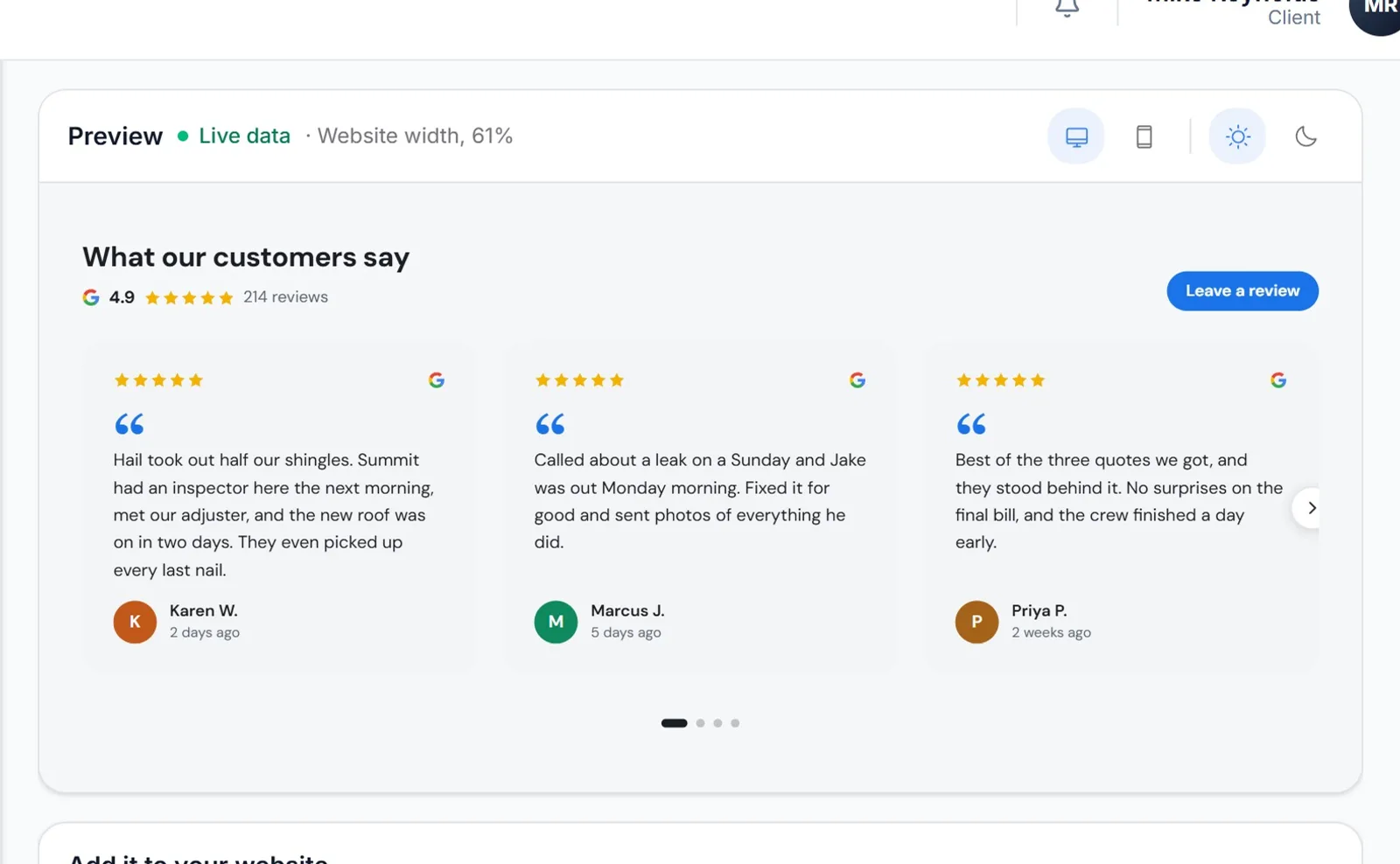
1/5 Pick what your website shows
How it works
Pick it on Google Maps to start. Connect the Google account that manages your profile and every review comes in, not only the few Google Maps shares.
Choose a carousel, grid, wall, list or badge and one of 8 designs, or set the fonts, colors and cards yourself. The preview draws it at a real website's width, and on a phone.
Copy the code into a page on WordPress, Wix, Squarespace, Webflow or plain HTML. After that, anything you save reaches the site within 5 minutes.
Five layouts
Pick the one that fits the page. The carousel shows 1 to 4 reviews across and swipes one at a time on a phone. A grid keeps every card the same size, the wall lets each review keep its length, the list stacks them, and the badge puts your rating in a header, a footer or a corner of every page.
Designs
One click sets the whole look: Classic, Minimal, Soft, Elegant, Midnight, Friendly, Warm or Editorial, each drawn with your real reviews. Then change anything you like. Your color, layout and words stay when you switch designs.
Your choice
It shows 4 and 5 star reviews that have words in them, newest first, up to 30, or 5 stars only. If there's one you'd rather leave off, like a review that quotes an old price, hide it and the next one moves up. The rating and count on top are Google's own, across every review, and link to your listing.
Every screen
The widget sizes itself to the space it's given, not the window: three across on a wide page, two in a narrow column, one at a time with a swipe on a phone. It draws in its own sealed box, so your site's styles can't break it and its styles never spill onto your page.
Install
Copy one line and paste it where the reviews should show: a Custom HTML block on WordPress, Embed HTML on Wix, a Code block on Squarespace, an Embed element on Webflow. The steps for each builder sit right under the code. Paste it once; what you save later reaches the site within 5 minutes.
More than reviews
The photos you put on Google from Posts & Photos show as a gallery that opens full screen, and your newest Google posts become a Latest updates feed, with offers and events that ended dropping off by themselves. Your website shows the same fresh work your Google profile does, and nobody has to copy it over.
Search engines
AI writes the questions your customers ask and answers them only from your Google profile, your AI Brain and your hours, never with a price, guarantee or license your facts don't state. You edit them before anything shows. The Business schema embed tells search engines your type of business, hours, address and services, and stays in step with Google.
Compared
Review widget tools sell plans by the month or the year, and some cap how many times a page can show them or put their name on the free plan. Here's what four of them say on their own pricing pages, checked in November 2026, next to what this costs you.
Prices and limits from each company's own pricing page, checked November 11, 2026: Elfsight, EmbedSocial, Trustindex, Paige, Trustindex help center. Trustindex's 10-review cap is from its help center. Zuops plans include the whole CRM, not only the widget.
For agencies
Website embeds run inside each client's white-label CRM. The code loads from your CRM's domain and nothing on the widget names the platform. Include the Google tools for every client, or sell them as an add-on for a monthly price or monthly credits.
How to
It takes about five minutes, and it's the same line of code on every website builder.
In your CRM, open Tools, then Website embeds, and pick Reviews. If you haven't yet, find your business on Google first.
Carousel, grid, masonry, list or badge, then one of 8 designs. Hide any review you'd rather leave off, and save.
Under the preview, click Copy code. It's one line: an empty box for the reviews and the script that fills it.
Use your builder's HTML or code box, at the spot on the page where the reviews should show, then publish the page.
Open the page on your phone: the carousel swipes one review at a time. Anything you change later shows within 5 minutes.
A photo gallery, Latest updates and an FAQ are made the same way. The business schema goes once in your site's header.
Where to paste it
Why Google Review Widget
Visitors read what your customers said on the page where they choose to call, without leaving for Google.
A busy month never switches it off, and a second page or a second site costs nothing extra.
No logo or "powered by" line. Your fonts, your colors, your corners.
One small script that loads after your page, drawn in its own sealed box.
The Leave a review button sends visitors straight to your Google review form.
Review replies, posts, photos and review requests run from the same place as the widget.
Pricing
Included on every plan. No fee per widget and no view limits.
Every plan includes the whole platform. Usage comes out of your plan's monthly credits.
See plans and credit pricesFAQ
Open Tools > Website embeds, pick Reviews, choose a layout and a design, then copy the one line of code and paste it into your page. The editor shows the steps for WordPress, Wix, Squarespace, Webflow and plain HTML. It takes a few minutes.
There's no separate charge. Website embeds are part of every Zuops plan, from $19/mo, with no fee per widget, no view limits and no branding, and a business can keep up to 100 of them. If an agency runs your CRM, the agency decides whether the Google tools are included in what you pay them.
No. You can start by finding your business on Google Maps. Google Maps only shares a handful of reviews, though, so connect the Google account that manages your Business Profile to show all of them. The photo gallery and Latest updates come from Posts & Photos, which needs the connection.
New reviews are read from Google about every hour while AI Review Replies is on, and whenever you open your reviews in the CRM. The widget picks up the change within 5 minutes after that. Nothing needs to be pasted again.
Yes. The carousel shows 1 to 4 reviews across on a wide screen, with arrows above it or on its sides, dots, and an optional slow turn every 4, 6 or 8 seconds that stops as soon as someone uses it. On a phone it swipes one review at a time.
It shows 4 and 5 star reviews with words in them, newest first, up to 30, or 5 star reviews only. You can hide any single review and the next one takes its place. The rating and review count at the top are Google's own, across all your reviews, and link to your listing, where visitors can read every one.
Pick one of 8 designs, then change the font (21 Google Fonts, or your site's own), the colors, card style, corners, spacing and how each review is laid out. For anything else there's a box for your own CSS, which only affects the widget.
Yes, and on any site where you can paste HTML that runs a script. WordPress: a Custom HTML block (WordPress.com needs a paid plan with plugins on). Wix: Add, Embed code, Embed HTML. Squarespace: a Code block, on the Core plan and up. Webflow: a Code Embed element, on a paid Webflow plan.
It's one small script, under 11 KB compressed, that loads after the rest of your page, and photos load as they scroll into view. It draws in its own sealed box, so it can't clash with your site's styles.
Don't count on it from any widget. Google says pages where a business controls the reviews about itself are "ineligible for star review feature", so the markup leaves stars out rather than risk it. What the Business schema embed does give Google is your type of business, hours, address and services, kept up to date.
It puts real answers to your customers' questions on your page as text, and can add FAQ markup that search engines and AI assistants read. Google stopped showing FAQ rich results in 2026, so expect no special look in Google itself. Every answer comes from your own facts, and you check them before they show.
Yes. It runs inside each client's white-label CRM, the code loads from your CRM's domain, and nothing on the widget names the platform. Include the Google tools for everyone or sell them as an add-on. If a client's add-on ends, their widgets quietly show nothing.
Yes. The REST API, the MCP server and the Zuops chat can list, create, change and delete embeds, write an FAQ and refresh the business details from Google. Each embed comes back with its line of code, ready to paste.
Still have a question?
Ask us. You get an answer in about a minute, and a person from the team takes over when needed.
Ask our teamSources, checked November 11, 2026
What this page says about Elfsight, EmbedSocial, Trustindex, Paige by Merchynt and Google comes from each company's own website (pricing, product and help pages), as it read on November 11, 2026. Prices and features change, so check each company's site for the latest before you decide. Which one fits better is our opinion. Elfsight, EmbedSocial, Trustindex, Paige by Merchynt and Google are trademarks of their owners, named only to identify the products compared. Zuops isn't affiliated with or endorsed by them. Spot something out of date? Tell us and we'll correct it.
Pick a layout, pick a design, paste one line.