Google Business Profile audit tool
Show prospects where they lose customers on Google Maps.
Audit a prospect's Google profile in about a minute, from public data alone: a score out of 100, where it ranks from 25 spots around town, who customers see instead and what to fix first. Then send the report in your agency's brand and see when they open it.
Watch it work39 sec10 audits a month free, then 3 credits each, refunded if one fails. Included on every plan, from $19/mo.



Loved by 1,300+ businesses


See it in action
See Google Audits in action.
Recorded inside Zuops with a demo business. Nothing here is a mockup.
1/6 Find any local business
How it works
A prospect's report in about a minute
- 01
Find the business
Type its name and town, or paste its Google Maps link. The search to check fills in from its Google category. No sign-in or access from the business.
- 02
We search Google Maps 25 times
Live, from a 5x5 grid of spots about a mile apart with the business in the middle, and read its profile, reviews, photos and the competitors beating it.
- 03
Send it in your brand
A report with your name, logo and colour that ends with your contact. Email it from the tool, then see when they open it.
No access needed
Audit any business before you ever speak to them.
All it takes is a name and a town, a Place ID or a Google Maps link, short links included. Pick the business, check the search it should win (filled in from its Google category, like "roofer" for a roofing contractor) and run it. Nothing reaches the business until you send it.
- Public Google data only, no Google sign-in
- The search to check fills in from the category
- The same business and search within 12 hours opens the audit you already have, free
The score
A score out of 100, from what can actually be measured.
Twelve checks across Google Maps, reviews and the profile, each weighted by what it's worth: top 3 spots, rank at the business's own address, main category, number and freshness of reviews, star rating, website, phone, hours, photos, description and whether it's claimed. Anything public data can't show is left out of the score, never guessed, and checks measured on a scale earn their share, so 100 means nothing is left to gain.
- Reviews and photos judged against the top 3 nearby
- Strong, Good with gaps, Needs work or Needs a lot of work
- Every check explained in a plain sentence
The map
See where they show up from 25 spots around town.
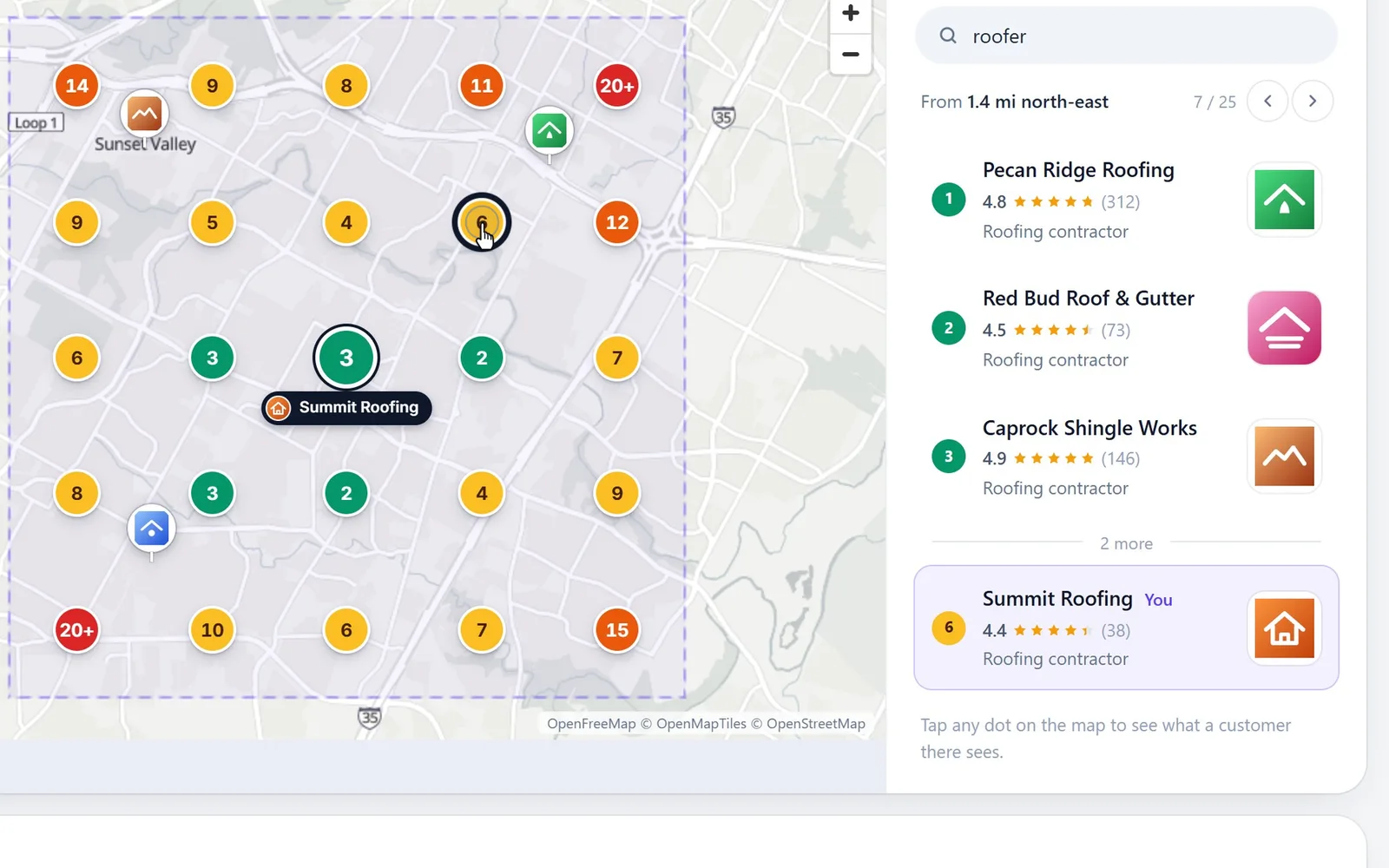
Customers see different results depending on where they stand. So the audit runs the search live on Google Maps from a 5x5 grid of spots about a mile apart, with the business in the middle, and draws every rank on a real street map. Tap a spot to see the three businesses a customer standing there sees first, and where this one lands.

Example report for a made-up roofing company. Tap a dot to see that spot.
The competition
Who customers see instead, side by side.
The three businesses that take Google's top 3 most often, next to the prospect: how many of the 25 spots each wins, with its own small map, plus reviews, rating and photos. It's all public, so the gap speaks for itself.
What to fix
A fix list written from the facts, not a template.
Each audit ends with up to five fixes, biggest gain first, each with the number behind it and exactly what to do. Every number in the summary has to match one the audit measured, or it's thrown out. No "rank #1", no guarantees and nothing against Google's rules, like keywords stuffed into the business name.
- Biggest gain, Worth doing or Quick win
- Says what's already working, too
- Plain words for a busy owner, no jargon
Your next step
It ends with your plan and a way to reach you.
After the fixes comes a plan in your agency's name: what you'd do in the first 30 days, every week and every month, worked out from this audit's numbers. Then "Want us to fix this?" with your booking link, phone and email, so the owner can book a call straight from the report.
- The plan fits the result: move up, win the rest of the map, or stay on top
- Your contact shows on every report, old ones too
- Save as PDF for a meeting or a leave-behind
Send and follow up
Email it in your brand, then call when they open it.
Send the report from the tool. The email goes out under your agency's name with the score, the headline and a button to the full report, and replies come straight to you. The subject and note are written from the audit's numbers, and you can change every word. Your list shows who opened it and how many times, so you know who to call.
- Send yourself a test first
- Your own previews never count as opens
- Up to 25 report emails a day, so cold outreach stays small
White label
Your brand on the report. Never ours.
The report carries your agency's name, logo and colour from your White-label settings, lives on your own domain once you've connected one, and never names the platform. To the business, it's a report from you.
- Your logo and colour on every section
- Your domain in the link
- "Prepared by" your agency
Do it by hand
How to audit a Google Business Profile: a 9-point checklist
These are the checks the audit runs, in the order they matter. You can do every one yourself with Google Maps and a notepad; the tool just does it from 25 places at once.
- 1
Search like a customer, from where they are
Search the main service on Google Maps from several spots around the business, not only from its address. The top 3 changes block by block.
- 2
Check the main category
It should name the core service as closely as possible. Compare it with the category of the businesses that show up first.
- 3
Count reviews against the top 3
Average the review counts of the three businesses that show up most. Fewer than half of that is a clear gap, and usually the first fix.
- 4
See how fresh the reviews are
The newest review should be under a month old. Nothing in the last 90 days looks quiet to anyone comparing businesses.
- 5
Look at the star rating
4.5 and up is good, 4.0 to 4.5 could be better, and under 4.0 needs fixing. Calm replies to low ratings help put it right.
- 6
Fill in the basics
A website link, a phone number that's answered in business hours, and opening hours, kept right on holidays.
- 7
Count the photos
Aim for 50, or as many as the businesses ahead. Real photos of finished work beat stock pictures every time.
- 8
Read the description
Google allows 750 characters. Use most of them to say what you do, where and for whom, in plain words, with no keyword stuffing.
- 9
Make sure it's claimed
If Google offers "Claim this business", nobody can fix the details, add photos or answer reviews until the owner does.
What a public audit can't see
- Calls, website clicks and direction requests: only the owner sees those, in the profile's own performance numbers.
- Searches other than the one you checked. Run another audit for another search.
- Tomorrow's results. Rankings change with where, when and on what device someone searches, so an audit is a snapshot.
For agencies
How to turn a Google audit into a sales call
A report about their own business, with their competitors' names on it, gets read. Here's how agencies use it without sounding like spam.
- 1
Pick businesses with room to grow
Audit the businesses you'd like as clients. A score in the 40s or 50s has clear, honest fixes to talk about.
- 2
Check the search they'd want to win
What a customer types, without the town: "roofer", "dentist", "garage door repair". It fills in from their category; change it if it's off.
- 3
Read it before you send it
Open the report yourself first. Your own previews never count as opens, so the open you see later is theirs.
- 4
Send it with a short note
The note is written from their numbers. Add one line of your own and send yourself a test to see what they'll get.
- 5
Call when it's opened
Your list shows when the report is opened and how many times. A business reading its own audit is ready to talk.
- 6
Keep it honest
Talk about what the numbers show and what you'd do first. Never promise a rank: nobody controls Google's results.
Why Google Audits
What it does for your agency.
Open with proof, not a pitch
Their own numbers from Google, next to the competitors beating them. Easy to read, hard to argue with.
About a minute per prospect
No access to ask for and nothing to set up. Audit the next one while you read the first.
Your brand, start to finish
The report, the email and the contact at the end all carry your agency's name.
Know who to call back
See who opened the report and how many times, right in your list.
Nothing made up
Unknowns are left out, and every number in the summary is one the audit measured.
Ten free every month
Then 3 credits an audit, given back if one doesn't finish.
Pricing
10 audits a month free. Then 3 credits each, refunded if one fails.
Every plan includes the whole platform. Usage comes out of your plan's monthly credits.
See plans and credit pricesFAQ
Google Audits: common questions
The basics
What is a Google Business Profile audit?
It's a check of how a business's Google profile is set up and how it shows up on Google Maps compared with the businesses near it: its category, reviews, rating, photos, description, website, phone and hours, and where it ranks for the search its customers type. Agencies use one to show a business owner what's holding them back.
What does the Google audit check?
Twelve things, weighted by what they're worth: top 3 spots on the map and the number of reviews (14 points each), rank at the business's own address (12), star rating and fresh reviews (10 each), website, photos and main category (7 each), whether it's claimed (6), opening hours (5), description and phone (4 each). If Google shows the business as closed, that's checked too.
How is the score worked out?
It's the points earned out of the points of every check that could be measured. Anything public data can't show is left out, never guessed. Spots in the top 3, reviews and photos earn their share of the way, measured against the top 3 businesses nearby, so a score of 100 means nothing is left to gain. 80 and up is Strong, 60 Good with gaps, 40 Needs work, and below that Needs a lot of work.
Do I need access to the business's Google account?
No. The audit uses public Google information only: the business's Google profile and live Google Maps searches. Nobody at the business signs in or grants anything, and nothing reaches them until you send the report.
How does the map ranking work?
The audit searches Google Maps live for the term you pick from 25 spots in a 5x5 grid about a mile apart, covering roughly 4 by 4 miles with the business in the middle. Each spot shows where the business came up in the first 20 results, and you can tap any spot to see the three businesses a customer there sees first. Results change with where, when and on what device someone searches, so it's a snapshot of that moment.
For agencies
Is the report white-label?
Yes. It shows your agency's name, logo and colour from your White-label settings, ends with your booking link, phone and email, and never names the platform. The link uses your own domain once you've connected one, and an unbranded address until then.
How do I send it, and will I know when they open it?
Click Send on the audit, type their email and send. It goes out under your agency's name with the score and a button to the full report, and replies come to you. The subject and note are prefilled from the audit and fully editable. Your list then shows when the report was opened and how many times. Your own previews never count.
Can I download the report as a PDF?
Yes. The report has a Save as PDF button and is laid out to print cleanly, map included, for a meeting or a leave-behind.
Cost
Is there a free Google Business Profile audit?
Yes. Every agency gets 10 audits free each calendar month. After that, each audit is 3 credits, and an audit that doesn't finish gives its free audit or credits back. Running the same business and search again within 12 hours opens the audit you already have, at no cost.
Which plans include Google audits?
Every plan, from $19/mo. Plans differ only in how many sub-accounts and credits they include, never in which tools you get. Audits past the free 10 come out of your agency's credits.
Compared with others
How is this different from Local Falcon, BrightLocal or Merchynt?
Local Falcon is a rank tracker sold by monthly credits, from $24.99 a month, where a 5x5 map scan uses 25 credits. BrightLocal's plans include a Google profile audit, from $31 a month billed yearly ($41 billed monthly). Merchynt's GBP Audit Tool has the lead sign in with Google, and its help center also describes a Light Audit for agency partners that runs without access to the profile. Google audits in Zuops needs nothing from the business, puts the map, competitors, fixes and your plan in one report in your brand, and comes with every plan. (Their prices checked November 2026.)
Can I run audits from the API or an AI assistant?
Yes. The REST API and the MCP server can find a business, run an audit, read it and send it, and you can ask for one in the Zuops chat in plain words. Running and sending still ask you first.
Still have a question?
Ask us. You get an answer in about a minute, and a person from the team takes over when needed.
Ask our teamSources, checked November 11, 2026
What this page says about Merchynt, Local Falcon and BrightLocal comes from each company's own website (pricing, product and help pages), as it read on November 11, 2026. Prices and features change, so check each company's site for the latest before you decide. Which one fits better is our opinion. Merchynt, Local Falcon and BrightLocal are trademarks of their owners, named only to identify the products compared. Zuops isn't affiliated with or endorsed by them. Spot something out of date? Tell us and we'll correct it.
Audit your next prospect in about a minute.
Ten audits a month are free, on every plan.
- Public data only
- Your brand, your domain
- See when they open it