Business listings and local citations
Your business on up to 25 directories. The same details on every one.
A free check shows where your business is listed, missing or wrong: Yellow Pages, BBB, Foursquare, Nextdoor, Bing, Apple, Yelp and more. Then an agent signs it up where it's missing and fixes what's wrong, in a real browser you can watch, with your Google profile's name, address and phone copied exactly.
Watch it work39 secThe check is free. 8 credits for each directory the agent submits to, and they come back for any it can't finish. On every plan.



Loved by 1,300+ businesses
See it in action
See Business Listings in action.
Recorded inside Zuops with a demo business. Nothing here is a mockup.
1/4 A free check of 25 directories
How it works
From a free check to listed, in three steps
- 01
Check where you're listed
One click looks for the business on every directory and compares its name, address, phone and website with your Google profile. Free, and it takes a few minutes.
- 02
Start the agent
It adds the business where it's missing, and claims and corrects the listings that are wrong. 8 credits a directory, back for any it can't finish.
- 03
Step in only when asked
A robot check only a person may tick, a code from a phone call, and the few sites only the owner can add. Emailed links and codes it handles itself.
NAP consistency
One name, address and phone, copied exactly to every site.
When one directory still has an old phone number or a different address, customers call a line you don't answer, and anyone comparing sites gets two stories. Business Listings takes the details from your Google profile, lets you check them once, then fills every form from that one card, so each listing says the same thing.
- Name, address, phone, website, hours, category and description
- Locked once the first directory has them, so nothing drifts
- Service-area business? The street is hidden where a site allows it
Copied exactly to
The free check
See where you're listed, missing or wrong. Free.
The check looks for the business on each directory, through the site's own search or Google results limited to that site, and reads what the listing shows. A listing with a different phone, address, name or website is marked Wrong details, with both versions side by side. Nothing is sent anywhere until you press Start.
The free check for a made-up roofing company.
The agent
An agent does the sign-ups, in a real browser.
On each directory it searches first, so it never makes a duplicate. Then it adds the free listing, or claims the one with wrong details and corrects it. It makes the account with its own login email and a strong password kept encrypted, opens the confirmation emails itself and types every detail from your card. Watch it live, and take over at any moment.
- Sites with a robot check go first, while you're most likely still there
- Emailed links and codes are read automatically
- The login it made on each site is kept for you
What it did
Live on Brownbook
Starting Hotfrog
Looking for Summit Roofing on Hotfrog
Creating the free account
Opening the confirmation email
Typing the business address
When it needs you
You step in only for what a person has to do.
Some sites show an "I'm not a robot" box, and the agent never ticks one itself: you tick it in the live view in a few seconds. If nobody's watching, it moves on and Do them now takes it back to each one with you there. A code from a phone call gets a box to type it in, and with your CRM number on the new listings, texted codes are read for you.
- Labelled Manual verification needed, so you know what's yours
- A bell when a run ends with sites waiting on you
- Skip any site, and its credits come back
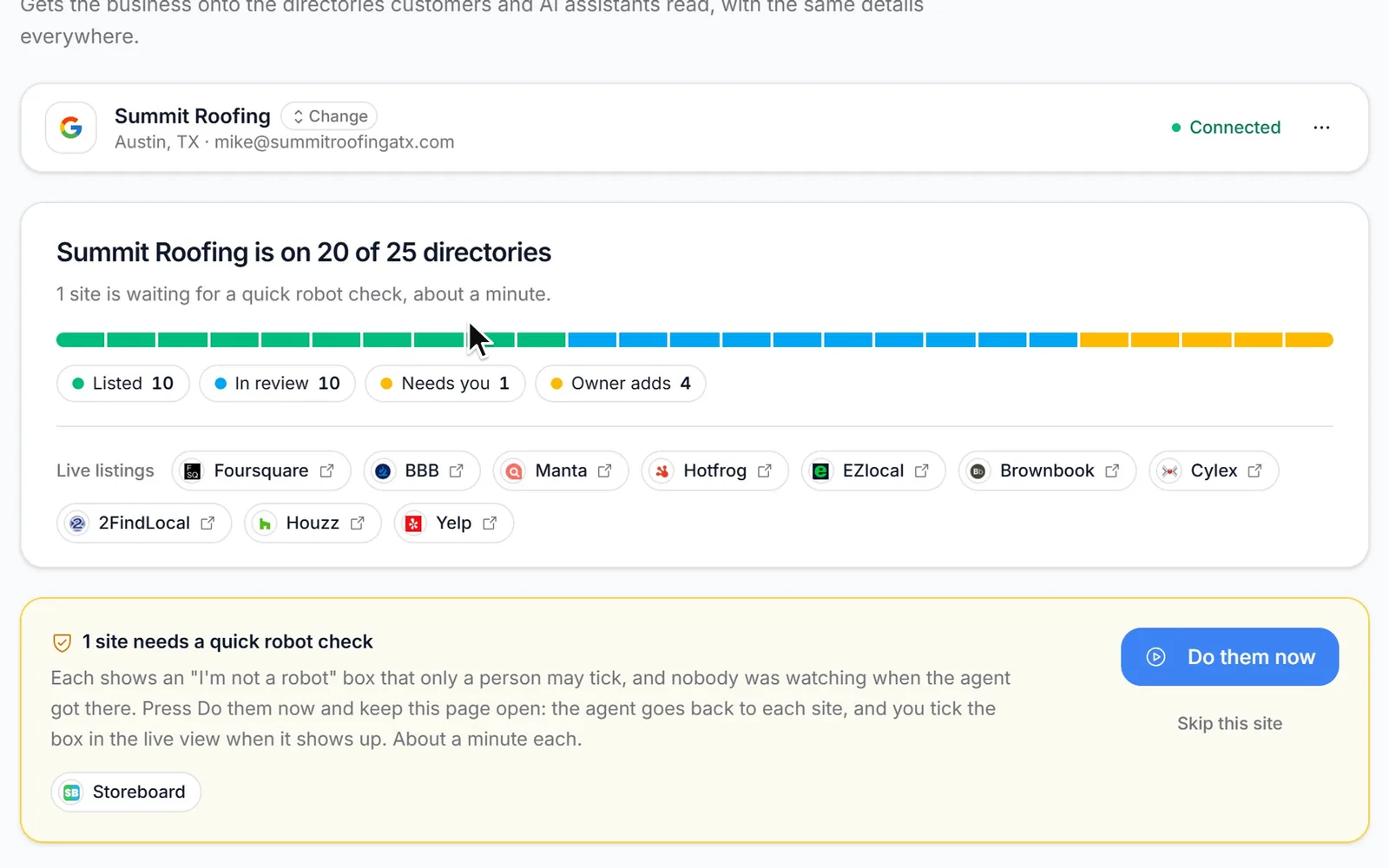
2 sites need a quick robot check
Each shows an "I'm not a robot" box that only a person may tick. Press Do them now and keep this page open: you tick the box in the live view when it shows up. About a minute each.
Yellow Pages: manual verification needed
Yellow Pages is calling (512) 555-0144 with a code. Type it here.
Business Listings: Summit Roofing needs you on 2 sites
2 robot checks to tick. Open Business Listings and press "Do them now".
Owner-only sites
The sites only the owner can add, made quick.
Bing Places, Apple Business, Yelp and Dun & Bradstreet need the owner's own account, and Data Axle takes new businesses and corrections by email. For each one you get the exact details to use, short steps and about how long it takes. Data Axle's email is written for you, with the correction when its listing is wrong. Mark each one done, paste the link, and it joins the others.
- Bing Places imports from Google in about 3 minutes
- Apple Business, Yelp and D&B, step by step
- Data Axle: one prefilled email
After the run
Checked every day until each listing is live.
Most directories review a new listing before it shows. Submitted ones are looked at again a few hours after the run, then every day for 45 days, and each one that goes live gets its link. One page shows what's listed, what's in review and what's left.
What it costs
8 credits a directory. Back if it can't finish.
The check is free. Starting costs 8 credits for each directory the agent submits to, new or corrected, and the total is on the button before you press it. A directory that ends without a new listing (already there, couldn't finish, or skipped) gives its credits back, and Stop and refund returns them for every site not submitted yet. Nothing monthly per location.
- Free check, once every 6 hours
- Pay only for the directories it submits to
- Refunded per directory, automatically
Rules it keeps
Free listings only, and nothing you didn't ask for.
The agent never pays, never enters card details and never starts a trial or a paid upgrade: a site that wants money is skipped. It never signs in with Google, Facebook or Apple, never writes reviews, posts or messages, and never contacts anyone through a site. Your Google profile isn't touched, and its phone number stays as it is.
For agencies
Citation building for every client, under your brand.
Business Listings runs in each client's sub-account in your white-label CRM and never names the platform. The credits come from your account, and with Rebilling a client who pays you in credits is charged per listing at your own price, refunds included. It's in the API, the MCP server and the AI chat too, so you can check or start a client's listings in plain words.
- Your price per listing, through Rebilling
- Run by each sub-account's owners and admins
- API: GET /v1/listings, POST /v1/listings/scan and /start
How to build local citations
How to build local citations the right way
Whether you do it by hand or let the agent do it, the order matters. Get the source right, then fix before you add.
- 1
Get your Google profile right first
Every listing copies it. Fix the name, address, phone, hours and category there before anything else.
- 2
Write your details one way
One business name with no keywords added, one phone number, one address format, the suite written the same way every time.
- 3
Fix wrong listings before adding new ones
An old listing with a past number keeps sending calls to it. Claim it and correct it, or send the right details through the site's own edit form.
- 4
Start with the sites that feed others
Data suppliers like Data Axle and Foursquare pass your details on to apps and maps, and Bing Places and Apple Business cover Bing, Apple Maps and Siri.
- 5
Keep every login
Each listing has an account behind it. Keep the email and password, so you can change the listing when you move or change your hours.
- 6
Change it everywhere when something changes
New number, new address, new hours: Google first, then every listing, with the logins you kept, so the old details don't linger.
Why Business Listings
What it does for your business.
Calls reach the right number
The old number on the sites that still show it gets corrected, so customers stop calling a line you don't answer.
Found where people look
Yellow Pages, BBB, Foursquare, Nextdoor, Bing, Apple Maps, Yelp and more, all with one set of details.
No forms to fill in
The agent searches, signs up, confirms the emails and types every detail. You tick the odd robot check.
Pay for listings, not tries
8 credits a directory, and they come back for any that ends without a new listing.
Your accounts, your listings
The login made on each site is kept for the business, so the listing can be changed later.
Every directory on one page
Listed, in review, wrong or missing, with a link to each live listing and what's left to do.
Pricing
Free check. Then 8 credits a directory, back if it can't finish.
Every plan includes the whole platform. Usage comes out of your plan's monthly credits.
See plans and credit pricesFAQ
Business Listings: common questions
The basics
What is a local citation?
Any mention of your business's name, address and phone number on another website: directories like Yellow Pages, BBB and Foursquare, map apps and the data suppliers that feed them. Building citations means getting listed on more of them. Cleaning them up means fixing the ones with old or wrong details.
What is NAP consistency, and why does it matter?
NAP is your name, address and phone. Consistent means every site shows them the same way. An old number on one directory is a call that never reaches you, and when sites disagree, people have to guess which version is right. Business Listings puts one set of details, taken from your Google profile, on every directory.
Which directories does it cover?
The agent signs the business up on Foursquare, BBB, Yellow Pages, Manta, Nextdoor, Hotfrog, ChamberofCommerce.com, EZlocal, Brownbook, MerchantCircle, Cylex, CitySquares, 2FindLocal, iBegin, Express Business Directory, Alignable, Storeboard, Lacartes and Cybo, plus Houzz for home-improvement trades. Bing Places, Apple Business, Yelp, Dun & Bradstreet and Data Axle are owner-only, with step-by-step help. Some sites only list US businesses, so the list depends on your country.
Do I need a Google Business Profile?
The business has to be on Google Maps, because that's where the details come from. With the profile connected, the full details are read, hours and description included. Without it, it starts from the Maps listing and you fill in what's missing before the check.
How it works
Does someone do it by hand, or is it automatic?
An AI agent does it, in a real web browser, one directory at a time. You can watch it live and take over whenever you want. A person is only needed for a robot check, a code sent by phone call, and the five owner-only sites.
Will it create duplicate listings?
It searches each site for the business before it creates anything. If the business is already there with the right details, that directory is marked listed and its credits come back. If the details are wrong, it claims the listing and corrects it, or sends the right details through the site's own edit form.
How long until the listings show up?
Some go live straight away. Most directories review a new listing first: usually within days, a few take weeks. Submitted listings are checked again a few hours after the run and then every day for 45 days, and each one that goes live gets its link.
Does it change my Google Business Profile?
No. It only reads the profile. Your Google listing and its phone number stay exactly as they are, even if you choose to show your CRM number on the new listings.
Cost and comparisons
How much does it cost?
The check is free, once every 6 hours. Starting costs 8 credits for each directory the agent submits to, and a directory that ends without a new listing gives its credits back. It's on every Zuops plan, from $19/mo, and the credits come from your plan's monthly credits.
Is it a Yext alternative?
It does the job a different way. Yext says on its own site that its pricing is custom, with no single published price, and that billing is typically annual. Business Listings is paid once per directory: a free check, then 8 credits for each directory the agent submits to. The agent creates and fixes the listings on each site, and the login it made there is kept for the business.
How does it compare with BrightLocal's Citation Builder or Whitespark?
BrightLocal's Citation Builder is a managed service: its specialists submit the listings by hand, from $2 a citation in bulk or $3.20 without, pay as you go. Whitespark's Listings Service is a one-time fee per location, with US packages from $399. Business Listings is an agent you run yourself: the check is free and each directory is 8 credits, refunded when it can't finish, with you stepping in for robot checks and owner-only sites.
For agencies
Can I offer it to my clients under my own brand?
Yes. It runs inside each client's white-label CRM and never names the platform. The credits come from your account, and with Rebilling a client who pays you in credits is charged per listing at your own price, with the same refunds.
Is there an API?
Yes. GET /v1/listings returns each directory's status and what's needed from the owner, POST /v1/listings/scan runs the free check and POST /v1/listings/start starts the agent. The MCP server and the Zuops AI chat can do the same in plain words.
Still have a question?
Ask us. You get an answer in about a minute, and a person from the team takes over when needed.
Ask our teamSources, checked November 11, 2026
What this page says about Yext, BrightLocal and Whitespark comes from each company's own website (pricing, product and help pages), as it read on November 11, 2026. Prices and features change, so check each company's site for the latest before you decide. Which one fits better is our opinion. Yext, BrightLocal and Whitespark are trademarks of their owners, named only to identify the products compared. Zuops isn't affiliated with or endorsed by them. Spot something out of date? Tell us and we'll correct it.
See where your business is listed.
The check is free and takes a few minutes.
- Up to 25 directories
- Wrong details shown side by side
- An agent that does the sign-ups