Google Maps rank tracker
See where you rank on Google Maps, street by street.
Your rank on Google Maps changes every few blocks. Map Rankings searches Google Maps for your keyword from every point on a grid around your business, and shows your spot at each one, who beats you there, and whether you're climbing week by week.
Watch it work30 secThe first scan of your first three searches is free. Then 0.25 to 2 credits a scan, by grid size. Included on every plan.



Loved by 1,300+ businesses
See it in action
See Map Rankings in action.
Recorded inside Zuops with a demo business. Nothing here is a mockup.
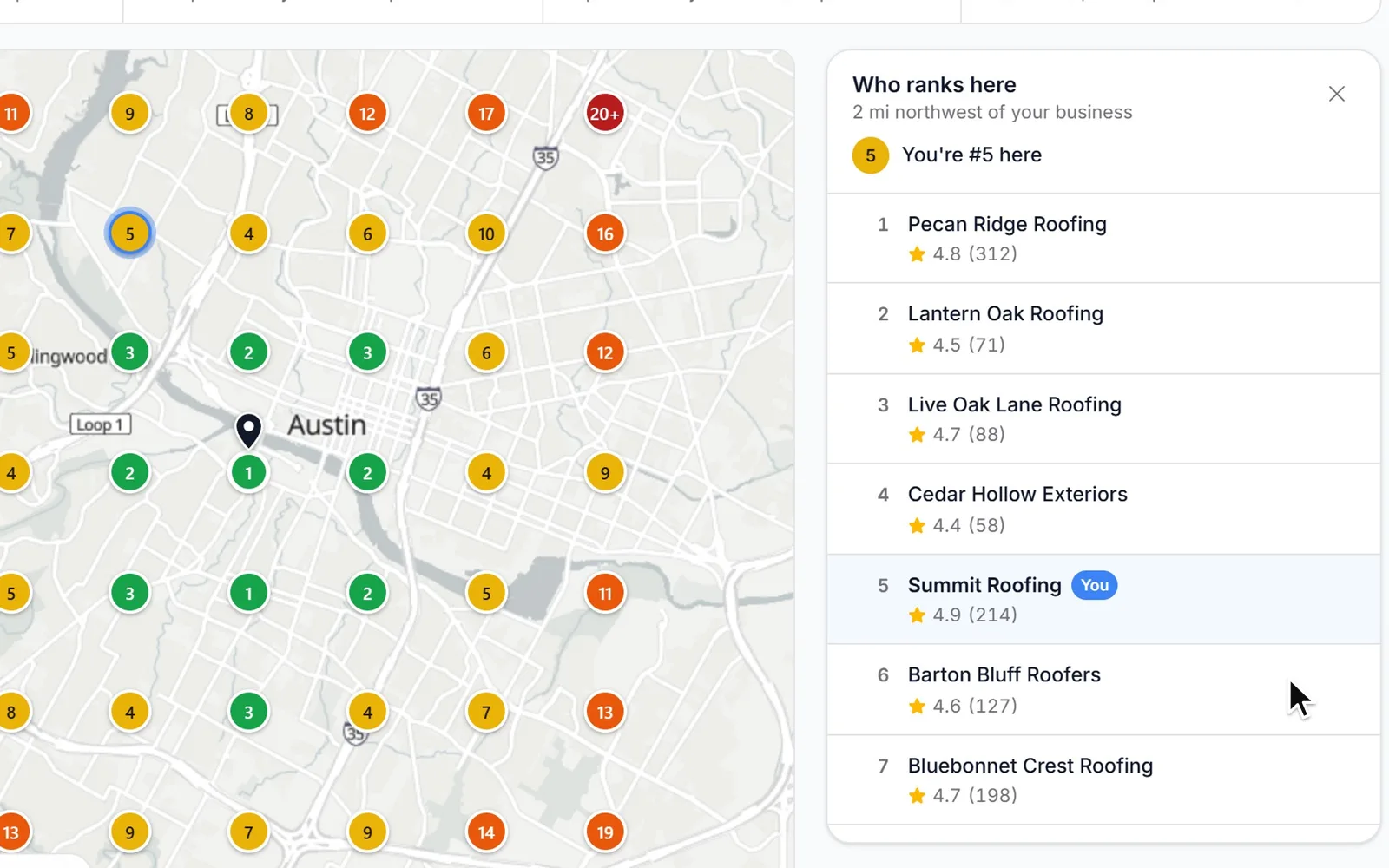
1/5 Pick a search and a grid
How it works
Your first map in about a minute
- 01
Type what customers search
Like "roof repair". Leave out the town: every point searches from its own spot. Popular searches for your business are suggested under the box.
- 02
Pick the grid
From 25 to 169 points, a quarter mile to 5 miles apart, centered on your Google pin. Tap the map to move it.
- 03
See your spot everywhere
Every dot is a Google Maps search from that point, colored by where you rank. Then it scans again every week or month on its own.
Why a grid
Your Google Maps rank changes every few blocks.
Google ranks local results partly by how far each business is from the person searching. So you can be first at your shop, fifth two miles away and not in the top 20 four miles out, where plenty of your customers live. One rank check from the office only sees the first of those. A grid sees all of them.
The same search for "roof repair", from three spots on one map. A made-up roofing company and its made-up competitors.
Set it up
Pick the search, the grid and how far apart.
Type what customers search, or tap one of the popular searches for your business. Choose the grid and the distance between points: tight in a busy city, wide for a big service area. It starts on your Google pin, and the preview shows exactly where every search will be made.
- Grids of 5×5, 7×7, 9×9 or 13×13 points
- 0.25 to 5 miles between points
- Up to 10 searches per business, each with its own grid
How it reads Google Maps
Every dot is a real Google Maps search.
For each point, Google Maps is searched for your keyword with the map centered there, at the same zoom every time, and the top 20 results are read. Ads are skipped. The dot shows where you came up: green in the top 3, yellow for 4 to 10, orange for 11 to 20, red when you're not in the top 20. The map fills in as the answers come back, usually in about a minute.
- The same zoom every scan, so any two scans compare fairly
- The top 20 read at every point
- Points Google doesn't answer are refunded
Spot by spot
Tap any dot to see who beats you there.
Each dot opens the list Google showed from that spot, in order, with every business's rating and review count, and how far that spot is from your business. The red corner of the map stops being a mystery: you see exactly who's showing up there instead of you.
Your competition
See who takes the top 3 most often.
Across the whole map, Top competitors counts how often each business makes the top 3 and its average spot, with you placed among them. It's the short list of who you're really up against for that search, and it's often not the list you'd guess.
Over time
Scanned every week or month, on its own.
Turn on weekly or monthly scans and each one lands on Ranking over time: your average spot across the whole map, or your share of top 3 spots, scan by scan, with the next scan already marked. Every scan is listed with how it moved, and any of them opens its map just as it was.
Example data for a made-up business, not a typical or promised result.
Before and after
Show the before and after, side by side.
Pick any two scans of a search and see their maps next to each other, each under its date, with the average spot, top 3 and top 20 counts, and how many spots got better or worse. Tap a dot to see that one spot before and after. Or switch to Changes to see how far each spot moved since the first scan.
Example data for a made-up business, not a typical or promised result.
What to do next
A short plan written from your own map.
The newest scan of each search comes with a few next steps to rank higher, written from what it measured: where you're weak, who leads there, how your reviews compare and what your last Google profile check found. Each step opens the tool that does it.
- Steps open the Profile Optimizer, review requests, review replies or Google posts
- Free, written the first time you open the scan
- Nothing against Google's rules, and no promise of #1 everywhere
Reports
Heat maps in the weekly or monthly Google report.
Google Reports emails the business a summary of its week or month on Google, with a heat map for up to three tracked searches, each one's average spot and share of top 3 spots, and, each month, who's most often in the top 3 around it. The Reports page also has a ready-made Map Rankings report to email on a schedule.
For agencies
Rank tracking for every client, in your brand.
Map Rankings runs inside each client's sub-account in your white-label CRM and never shows the platform's name. Include it, sell it with the other Google tools as an add-on, or charge each client per scan through Rebilling at your own price. The heat maps go out in each client's report, from your brand.
- Free for every client, a monthly price, or monthly credits
- Your own price per scan (a 7×7 counts as 2 scans, a 13×13 as 8)
- Heat maps in each client's report, sent in your name
How to rank higher
How to rank higher on Google Maps
Google says local results are mainly based on relevance, distance and popularity. You can't move your shop, but you can work on the other two. Do these in order, then measure.
- 1
Measure where you are
Track your two or three main searches on a grid, weekly. One check from the office hides where you're losing.
- 2
Verify and complete your profile
Verified, with the right main category, services, hours and service area. The Profile Optimizer checks it and shows which categories the businesses above you use.
- 3
Earn reviews, steadily
Google says more reviews and positive ratings can help your local ranking. Ask every happy customer, every week, not in bursts.
- 4
Reply to every review
Google says replying shows customers you value their feedback. Answer the good and the bad, in your own words.
- 5
Add photos and posts
Real photos of your work and regular Google posts keep the profile active and give people a reason to pick you.
- 6
Scan again and compare
Look at Before & after on the same grid a month or two later. Change one or two things at a time so you know what worked.
Which grid to pick
- A shop in a busy city: 7×7, half a mile to a mile apart.
- A service-area business covering a metro: 9×9, 1.5 to 2 miles apart.
- A rural or regional business: 7×7 or 9×9, 3 to 5 miles apart.
- Keep the same grid for a search once you start, so every scan compares with the last.
Why Map Rankings
What it does for your business.
“Local results are mainly based on relevance, distance, and popularity.”Google Business Profile Help: Tips to improve your local ranking on Google
See your whole service area
Not one rank from your office: your spot at every point around you, on one map.
Know who you're up against
The businesses that beat you, where, and how their ratings and reviews compare with yours.
Find the weak side of town
The orange and red corners show where you're losing customers to someone closer.
Prove the work is paying off
Before and after maps from the same grid and zoom, side by side.
Scanned on a schedule
Weekly or monthly, on its own, with every scan kept on one chart.
Pay per scan, not per month
A 7×7 scan is half a credit. No separate rank tracking subscription.
Pricing
From 0.25 credits a scan. The first scan of your first three searches is free.
Every plan includes the whole platform. Usage comes out of your plan's monthly credits.
See plans and credit pricesFAQ
Map Rankings: common questions
The basics
What is a local rank tracker?
It's a tool that checks where your business shows up on Google Maps for a search, from many points around you instead of one. You may also see it called a geo grid rank tracker or a local SEO grid. Each point on the grid is its own Google Maps search, so you see where you rank across your whole service area, not only from your office.
Why is my Google Maps ranking different in different places?
Google ranks local results partly by how far each business is from the person searching. Someone a block from your shop and someone four miles away see different lists for the same search. That's why a single rank check can say you're #1 while customers across town never see you.
How do I track my Google Maps rankings by location?
Find your business on Google Maps in Zuops, type a search like "roof repair", pick a grid (for example 7×7 points, 1 mile apart) and start tracking. Google Maps is searched from every point and each dot on the map shows your spot there. Scans repeat every week or month on their own.
Is it what customers see on their phones?
Close to it. Each point is a Google Maps search made from that spot at the same street-level zoom, read like a fresh search with no history, and ads are left out. One person's results can still move a little with their own search history and exactly where they're standing, so read each dot as a fair snapshot, not a promise.
Do I need to connect my Google account?
No. Map Rankings only needs the business found on Google Maps. Connecting Google is for the tools that change your profile, like review replies and posts.
Cost and setup
How much does it cost?
It's on every plan, from $19/mo. A scan of one search costs 0.25 credits on a 5×5 grid, 0.5 on 7×7, 1 on 9×9 and 2 on 13×13. The first scan of your first three searches is free, and points Google never answers are refunded. One search on a 7×7 grid scanned every week comes to about 2 credits a month.
Which grid size and distance should I use?
Smaller in a busy city, bigger for a wide service area. A shop in town usually does well with 7×7 points half a mile to a mile apart. A business that drives across a metro might use 9×9 points 1.5 to 2 miles apart. Once you start, keep the same grid for that search so every scan compares with the last.
How many keywords can I track, and how often?
Up to 10 searches per business, each with its own grid and schedule: every week, every month, or only when you tap Scan now. A scan usually takes about a minute.
My business hides its address on Google. Does it still work?
Yes. Service-area businesses pick the middle of the area they serve instead: type a town or tap the map. Your spot at each point is found by your Google listing, so it works the same way.
How long are scans kept?
Every scan's ranks and numbers stay, so Ranking over time and Before & after reach back to your first scan. Who ranked at each spot is kept for 120 days, and always for a search's first scan.
Comparisons
How is it different from Local Falcon or BrightLocal?
Local Falcon sells credits, one per grid point, so a 7×7 scan uses 49; its plans start at $24.99 a month for 7,500 credits, or $0.05 a credit pay as you go. BrightLocal includes grids in its plans, from $31 a month billed yearly for one location, with grid tracking for up to five keywords. In Zuops a 7×7 scan is half a credit, it's part of the plan you already have, and it sits next to your reviews, Google posts and reports. Their prices as published on their own sites in November 2026.
For agencies
Can I give my clients rank tracking under my own brand?
Yes. It runs inside each client's white-label CRM and never names the platform. Include it, sell it as part of the Google tools add-on for a monthly price or monthly credits, or charge per scan at your own price with Rebilling. The heat maps go into each client's Google report, emailed from your brand.
Is there an API?
Yes. The REST API and MCP server can list tracked searches and scans, read every point of a scan, track a new search, change its schedule and start a scan, and you can ask for it in the Zuops chat in plain words.
Still have a question?
Ask us. You get an answer in about a minute, and a person from the team takes over when needed.
Ask our teamSources, checked November 11, 2026
What this page says about Local Falcon, BrightLocal and Google comes from each company's own website (pricing, product and help pages), as it read on November 11, 2026. Prices and features change, so check each company's site for the latest before you decide. Which one fits better is our opinion. Local Falcon, BrightLocal and Google are trademarks of their owners, named only to identify the products compared. Zuops isn't affiliated with or endorsed by them. Spot something out of date? Tell us and we'll correct it.
See where you rank on Google Maps.
The first scan of your first three searches is free and takes about a minute.
- Up to 169 points a scan
- The top 20 at every point
- Weekly or monthly, on its own