AI proposal software
From proposal to signed client, in one link.
Describe the client and what you're offering. The AI designs a web proposal in your brand, with your packages and your prices. Your client picks a package and add-ons, clicks I agree, signs the contract and goes straight into onboarding.
Watch it work40 secIncluded on every plan, from $19/mo. Writing a proposal with AI is usually 1.5 to 3.5 credits.



Loved by 1,300+ businesses
See it in action
See Proposals & Contracts in action.
Recorded inside Zuops with a demo business. Nothing here is a mockup.
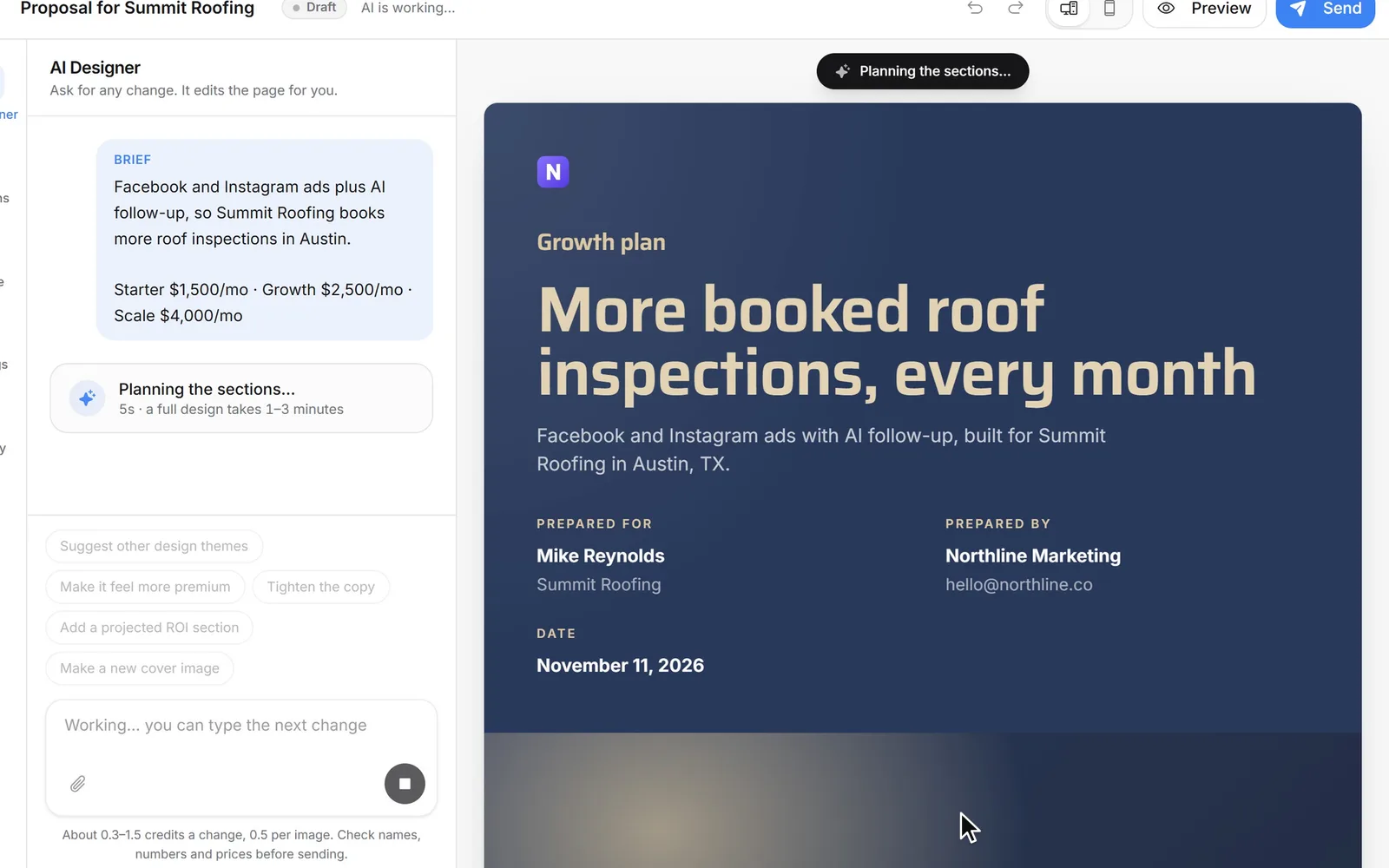
1/5 Describe the client and the offer
How it works
Your first proposal in a few minutes
- 01
Say who it's for and what you offer
A few lines about the client and the work, your prices if you have them, and a look. Or start from a template, or paste your own HTML.
- 02
The AI designs it in front of you
Cover, letter, scope, timeline, packages and next steps, written section by section. Then change anything by asking, or click and type.
- 03
Send one link
Your client reads it on any screen, picks a package, says yes and signs. You see every open and get an email the moment they agree.
Designed by AI
A finished proposal from a few lines.
Write what you'd tell a colleague after the sales call: who the client is, what you'll do, what it costs. The AI plans the sections, writes them for that client's business and lays them out in your look, one section at a time, so you watch the proposal come together. It reads the client's website when you give it, and it usually takes one to three minutes.
Honest by design
It never makes up results, reviews or prices.
A proposal with an invented case study is a promise you can't keep. The AI writes only from what you give it. Where a fact is missing, like a result you've had or a price you haven't set, it leaves a marked blank instead of guessing. The editor counts the blanks and takes you to each one, and the send screen shows any you missed.
- No invented clients, testimonials, awards or guarantees
- Numbers about the future are written as goals, never promises
- Prices only from you, or a blank like [$X,XXX]
Edit by chatting
Change anything by asking.
Tell the AI Designer what to change, the way you'd tell a designer: make it feel more premium, add a cheaper starter package, tighten the copy, make a new cover picture. Pick one section first to change only that. Or click any word on the page and type. Every change, yours or the AI's, is one step you can undo.
- Quick ideas under the message box
- Ask about one section, or the whole thing
- Undo and redo, 40 steps back
Your look
Your brand, or one of 12 designed looks.
Start in your own colours, or pick a look made for the kind of client you're pitching: Executive, Editorial, Studio, Emerald, Electric and more. Each sets the fonts, colours, corners and texture, and you can change it any time without rewriting a word. Sections come in designed layouts, so it never looks like a document someone styled at midnight.
- 16 section types, many with several layouts
- 26 fonts built in, or your own from Google Fonts
- Check it at phone width before you send
Six of the 12 looks, plus one in your own colours.
The client's side
Your client picks a package and sees the total.
The proposal is a web page, not a PDF attachment. Your client reads it on their phone or laptop, chooses a package, ticks the add-ons they want and watches the total change, with monthly and one-time prices kept apart. Their choice goes straight into the agreement, so nobody retypes a price.
Proposal to contract to onboarding
I agree, signed and onboarded, without a single email.
When your client clicks I agree, the contract is made from your template with the package, price and add-ons they picked already filled in. They sign it on the next screen, and then land in your onboarding signup or on your booking page to pick a kickoff call. The signature records the time, their IP address and their device, and they get a PDF copy.
Know when they read it
See who opened it, and what they read twice.
Every proposal shows its views, when it was first and last opened, and how long your client spent on each part. If they lingered on pricing, you know what the follow-up call is about. You get an email the first time they open it and the moment they say yes.
- Views and total reading time
- Time on each section
- An email on the first open and on the yes
Your own design
Bring your own HTML and CSS.
Already have a proposal design you love? Paste it in. Your page's styles become your Brand CSS, shared by every custom section, and the packages and I agree block still work underneath. Add {{client_company}} and other variables, and the same template fills in for every client. Nothing in it runs scripts, so it's safe to send.
- No AI and no credits for a design you bring
- Variables for the client, your company and the dates
- Build it from Claude or ChatGPT through the API and MCP
Next client
Reuse your best proposal for the next client.
Save any proposal as a template, or use it for another client: the design, sections and prices stay, and the AI rewrites the client's name, industry, goals and letter for the new one. A template with variables fills itself in, with no AI at all.
- Save as template, start from a template
- Use for another client, about 0.3 to 1.5 credits
- Pick the client from your own leads
For local businesses
Quotes that sell, not a price in an email.
Proposals is in every sub-account's Tools too. A roofer, a remodeler or a med spa can send a customer good, better and best options with add-ons, from the business's own name. It goes to the lead by email or text, the customer says yes and signs, and the booking page opens so they can pick a time.
- Sent through the lead's own conversation
- Ends on the business's booking page
- Noted on the lead's timeline
For agencies
Give your clients proposals, under your brand.
Proposals and Contracts run in each client's white-label CRM, and the platform's name never shows. Include them, sell them as add-ons, or let the AI work come out of the client's own credits at your price with Rebilling. Hide either one from any client in a click.
- Included, a monthly add-on, or charged per use
- Your client's brand on every proposal they send
- Never names the platform or an AI model
How to write a proposal that gets signed
How to write a marketing proposal clients say yes to
The same few things decide most proposals, whether the AI writes yours or you do. Here they are, in the order the client reads them.
- 1
Start with their goal, in their words
Open with what they told you on the call: the jobs they want more of, the slow month, the competitor down the road. Not your company history.
- 2
Say exactly what you'll do
A scope with what's included and what isn't stops most arguments before they start. Keep each line short enough to read on a phone.
- 3
Show when it happens
A simple timeline, week one to month three, answers the question every client has: when do I see something?
- 4
Offer two or three packages
Let them choose between options instead of yes or no. Put optional extras in add-ons, priced on their own.
- 5
Only promise what's true
Use real results with permission, or none. Write numbers about the future as goals. Clients remember a promise you didn't keep.
- 6
Make yes one click
Put the agreement and the signature right after the price, then the next step. Follow up when they open it, not a week later.
Why Proposals & Contracts
What it does for your agency.
Send proposals the same day
A finished, designed proposal from your call notes in minutes, while the client still remembers the call.
No retyped prices
The package and add-ons they pick go straight into the contract they sign.
Nothing made up
Missing facts are marked as blanks for you to fill, never guessed.
Follow up at the right time
See when they open it and what they read, and get an email when they say yes.
Onboard without the back and forth
Signed clients land in your signup or on your calendar on their own.
One tool fewer
Proposals, contracts, onboarding, CRM and booking in the same place, with no charge per user.
Pricing
Included on every plan. AI writing is usually 1.5 to 3.5 credits a proposal.
Every plan includes the whole platform. Usage comes out of your plan's monthly credits.
See plans and credit pricesFAQ
Proposals & Contracts: common questions
The basics
What does Zuops Proposals do?
It designs a web proposal with AI from a few lines about the client and the offer, lets you change it by chatting or by hand, and sends it as one link. Your client picks a package and add-ons, clicks I agree, signs the contract and goes straight into onboarding or your booking page.
Can AI write a business proposal for me?
Yes. Tell it who the client is, what you'll do and your prices, and it writes and designs the whole proposal: cover, letter, goals, scope, timeline, packages and next steps. It writes only from what you give it and leaves marked blanks for anything it doesn't know, so you check those before it goes out.
Will the AI make up results or testimonials?
No. It's told never to invent results, client names, testimonials, reviews, awards, team members, years in business or guarantees. Where one would help, it leaves a blank like [Add a result you achieved]. Numbers about the future are written as goals, and prices come only from you.
What can a proposal include?
Sixteen kinds of section: cover, letter, cards, text and image, scope, timeline, numbers, case study, investment (packages, add-ons or a price table), team, testimonial, questions, images, text, your own HTML and next steps. Up to 40 sections in one proposal.
Signing and onboarding
Can clients sign the proposal online?
Yes. When they click I agree, the contract is made from your template with their package and price filled in, and they sign it on the next screen by drawing their signature. The time, their IP address and their device are recorded with it, they get a PDF copy, and you can countersign.
What happens after the client signs?
Whatever you set when you made the proposal: your onboarding signup link, where they create their account and pay if you've set that up, or your booking page to pick a kickoff call. A local business's proposal can end on its booking page.
Can I see when a client opens my proposal?
Yes. Each proposal shows its views, when it was first and last opened, the total reading time and the time spent on each section, with a timeline. You get an email the first time it's opened and when the client says yes.
Design
Can I use my own branding, or my own HTML and CSS?
Yes. Start in your own colours or one of 12 looks, and change fonts, colours and corners any time. Or paste your own HTML and CSS: your styles become your Brand CSS, variables like {{client_company}} fill in for each client, and the packages and I agree block still work. Scripts never run.
Can I reuse a proposal for another client?
Yes. Save it as a template, or use it for another client: the design and prices stay and the AI rewrites the client's details, usually for 0.3 to 1.5 credits. A template that uses variables fills itself in with no AI.
Price
How much does it cost?
Proposals is on every Zuops plan, from $19/mo, with unlimited team seats. The AI is paid in credits for what it actually uses: writing a proposal is usually 1.5 to 3.5 credits, a chat change 0.3 to 1.5, and each AI picture 0.5 (a failed picture is never charged). A design you bring yourself uses no credits.
How is it different from PandaDoc, Proposify, Qwilr or Better Proposals?
Their paid plans are priced per user. On their own pricing pages in November 2026: PandaDoc Business $49 per seat a month, Proposify Build $39 per user a month, Qwilr Starter $35 per user a month and Better Proposals Premium $21 per user a month, each billed annually. PandaDoc also lists a free plan. Zuops includes Proposals and Contracts on every plan, next to the CRM, booking and onboarding the signed client goes into.
For agencies
Can my clients send proposals under my brand?
Yes. Proposals and Contracts are in every client's white-label CRM, under Tools, and never name the platform or an AI model. Include them, sell them as add-ons, or charge the AI work to the client's credits at your own price. You can hide either one from any client.
Is there an API?
Yes. The REST API and MCP server can list, create, edit, duplicate, link and send proposals, including from your own HTML and CSS. So Claude or ChatGPT can build a proposal in your design and save it as a template, and you can ask for one in the Zuops chat in plain words.
Still have a question?
Ask us. You get an answer in about a minute, and a person from the team takes over when needed.
Ask our teamSources, checked November 11, 2026
What this page says about PandaDoc, Proposify, Qwilr and Better Proposals comes from each company's own website (pricing, product and help pages), as it read on November 11, 2026. Prices and features change, so check each company's site for the latest before you decide. Which one fits better is our opinion. PandaDoc, Proposify, Qwilr and Better Proposals are trademarks of their owners, named only to identify the products compared. Zuops isn't affiliated with or endorsed by them. Spot something out of date? Tell us and we'll correct it.
Send your next proposal today.
Describe the client and the offer. The AI does the design.
- Packages and add-ons they pick
- I agree, signed, onboarded
- Included on every plan