Free website analytics
See exactly how people use your website, and where they give up.
Heatmaps, recordings of real visits, rage clicks, the form field people quit at and the ad behind every visit, from one line of code. It tells you what stands out in plain words, and you can ask it anything. Free in every Zuops account and in every client's white-label CRM.
Watch it work39 secFree on every plan. No credits, no add-on, no cookies. 25,000 recorded visits a month per business.



Loved by 1,300+ businesses



See it in action
See Website Analytics in action.
Recorded inside Zuops with a demo business. Nothing here is a mockup.
1/5 One line on your website
How it works
Your first visitor in a few minutes
- 01
Paste one line
Copy it into your site's head, with steps for WordPress, Wix, Squarespace, Shopify, Webflow and more, or email it to whoever runs your site. Smart Pages need nothing at all.
- 02
Open your website
The setup screen turns green the moment the first visit arrives. From then on visits, clicks, scrolls and recordings come in by themselves.
- 03
Fix what it finds
It points out what stands out, like a button people keep tapping that does nothing, and opens the heatmap or the recordings that show it.
What stands out
It reads the numbers so you don't have to.
Every week has a few things worth knowing: a photo people keep tapping, the form field where they give up, the ad whose visitors leave in seconds. Website Analytics works them out from your own visits and says them in a sentence, with the numbers behind it and a button to the heatmap or the recordings. It's plain arithmetic on your data, so nothing is made up.
- Visitors, time on site, leave right away and converted, against the period before
- Findings only when there are enough visits behind them
- Tap any row, like a city or a campaign, and everything narrows to it


Heatmaps
Free heatmaps, on a picture of your real page.
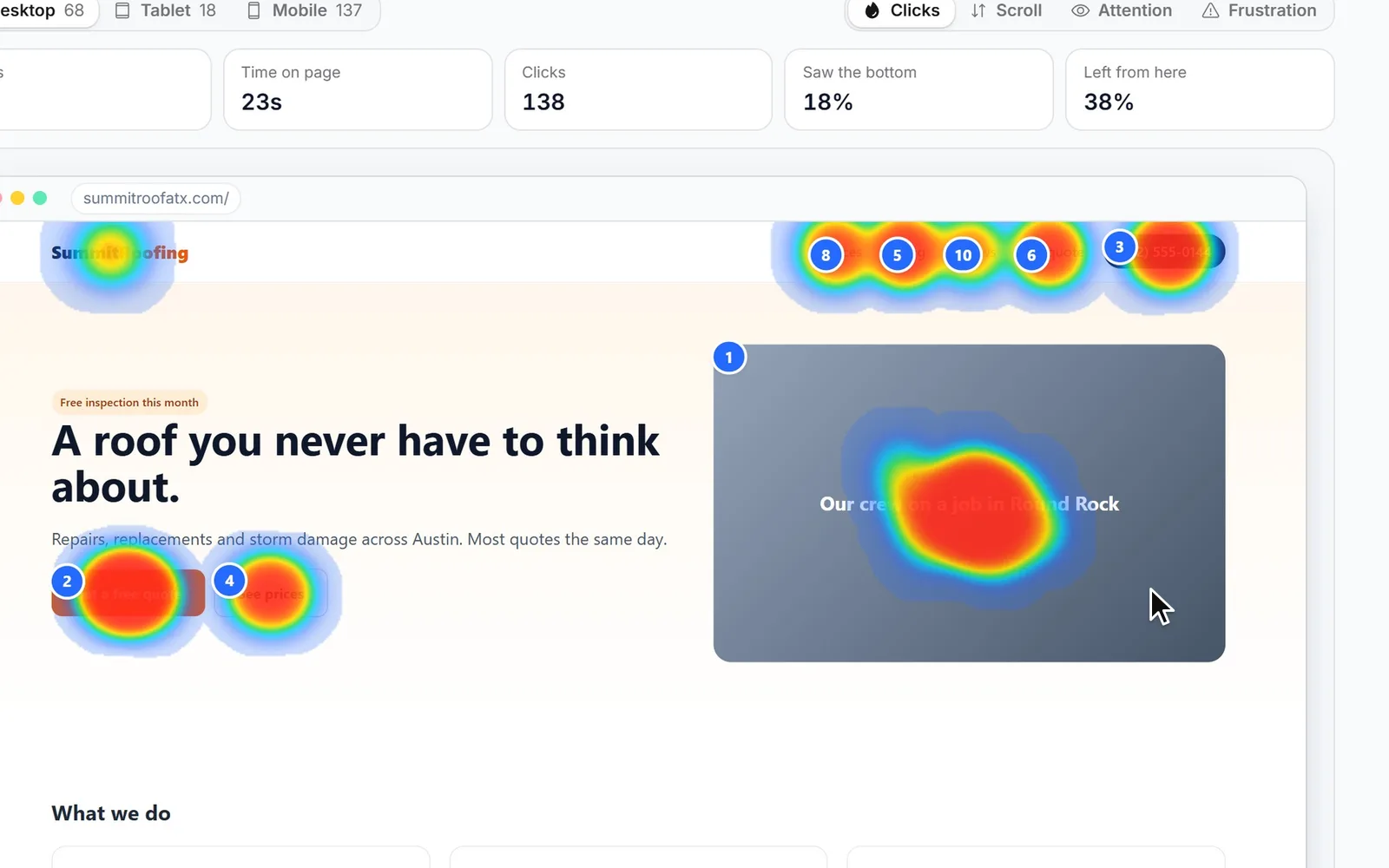
See where people click, how far they scroll, which parts they actually look at, and where they get frustrated, on desktop, tablet and phone. The heat is drawn on a picture of the page as visitors saw it, so you see the real button, not a box. The ten most clicked things are numbered and listed in words.
A made-up roofing company's home page, last 7 days on computers.
Rage and dead clicks
Find the button that doesn't work.
When someone clicks the same spot three times in a second, something looked clickable and wasn't. When a click changes nothing, it was a dead end. Both are counted on every element and every page, with how many visitors hit them and on which device, plus quick backs and JavaScript errors.
- Rage clicks, dead clicks, quick backs and errors in one place
- The element, the page and the device behind each
- Watch the frustrated visits in one tap

Session recordings
Watch real visits, the ones worth watching first.
Every visit can be recorded and played back: where the mouse went, what they scrolled past, what they clicked and when they left. The ones worth watching come first: frustrated visits, visits that converted, real engagement. Idle time is skipped, the timeline marks each page and each rage click, and one tap writes the visit up in a few sentences.
Forms
See the exact field where people give up.
For every form on your site: how many people started it, how many sent it, and which field the rest stopped at. Only field names are recorded, never what anyone typed. Then watch the visits of people who gave up, and you'll usually see why in a minute.

Ads and sources
Know which ads bring people who stay.
Meta and Google ad clicks are recognized by themselves from their click IDs, with no setup. Add UTM tags and you also see each campaign, ad and keyword. For each one: how many people came, how long they stayed, how many left right away and how many converted.
- Meta, Google, Microsoft, TikTok and LinkedIn ad clicks
- Campaigns, ads and keywords from your UTM tags
- Sources, channels and referring sites for everyone else

 Where they came from
Ask AI
Ask about your website in plain words.
Which page works best? Why do phone visitors leave? Are my Facebook ads bringing people who stay? The answer is written from your own visitors, clicks and recordings for the dates you picked, with the numbers behind it, and with buttons that open the right heatmap or recordings. It's free, up to 40 questions a day per person.
Conversions
Form sends and phone taps count by themselves.
A visit converts when someone sends a form, taps your phone number or email, reaches a thank-you page or fires your own event. Your Zuops Smart Forms and booking pages count wherever they're embedded, and your Smart Pages are tracked with nothing to paste. When one of them makes a lead, the lead shows how they found you: where they came from, the campaign, the pages they read, and a button to watch the visit. A funnel builds itself from your top landing page.


Privacy
No cookies. Nothing typed. Real people only.
Visitors are counted with a random id in their own browser, not a cookie, and IP addresses aren't stored. Anything typed into your site is hidden in recordings, and one switch hides every word. Robots, crawlers and Meta's ad checkers are left out of every number, and so are your own visits.
- No cookies, no IP addresses, no typed text
- Hide any part of a page with one attribute
- Visits kept 400 days, recordings 30 days
Compare
How it compares with Hotjar, Clarity and PostHog.
Microsoft Clarity and PostHog have free plans too, and Hotjar's site now sends you to Contentsquare. These are each company's own words, read in November 2026. The difference with Zuops is where it lives: inside the CRM with your leads, ads and forms, under your own brand.
Hotjar
hotjar.com now opens Contentsquare's site
- New accounts
- “It's no longer possible to create a new account on Hotjar.”
- Hotjar Free
- 35 sessions a day
Microsoft Clarity
“Clarity is a free service forever.”
- Recordings
- Up to 100,000 sessions per project a day
- Recordings kept
- 30 days; favorites and a sample up to 9 months
- Cookies
- First-party cookies, with consent where the law asks
PostHog
Free allowance every month
- Session replays
- 5K recordings a month free
- Recordings kept
- 1 month on the free plan
Zuops Website Analytics
$0In every account and every client's sub-account
- Price
- Free on every plan
- Recorded visits
- 25,000 a month per business
- Recordings kept
- 30 days, starred 6 months
- Cookies
- None
- Where it lives
- In your CRM, under your brand
From contentsquare.com/hotjar (where hotjar.com now goes), Microsoft's Clarity site and FAQ, and posthog.com/pricing, read November 11, 2026. Quotes are their own words. Plans and limits change; check theirs before you decide.
For agencies
Heatmaps and recordings for every client, under your brand.
Website Analytics is in every sub-account of your white-label CRM. The line each client pastes loads from your domain and never names the platform. Send each client a website report on a schedule, and use the API or MCP to read it from your own tools.
- Unlimited client sub-accounts from $99/mo
- 25,000 recorded visits a month for each client
- A ready-made Website report, emailed on a schedule
Setup
How to add heatmaps and session recordings to your website
It's one line in the head of every page. Website Analytics shows you the line and these steps for your website builder.
- 1
Copy your line
Open Tools > Website Analytics in your CRM and press Copy code. Using a Smart Page? Skip this: it's tracked already.
- 2
Paste it in the head
WordPress: install the free WPCode plugin, open Header & Footer and paste it into Header. Other builders are in the list below.
- 3
Open your website
Visit your site once. The setup screen turns green when the first visit arrives, or check any page for the line.
Where the line goes on other builders
- Leave your own visits out: open your site once with ?zs_ignore=1 at the end of the address, on each phone and computer you use.
- Wix: Settings > Custom code, + Add Custom Code, All pages and Head. Wix asks for a paid plan with your own domain.
- Squarespace: Settings > Developer tools > Code injection, then Header.
- Shopify: Online Store > Themes > Edit code, layout/theme.liquid, just above </head>.
- Webflow: Site settings > Custom code > Head code, then publish.
- GoDaddy: Settings > Site-wide code > Head HTML.
- GoHighLevel and ClickFunnels: the Head tracking code box in the funnel's settings.
- Google Tag Manager: a Custom HTML tag on All Pages, then submit the container.
Why Website Analytics
What it does for your business.
Find the button that doesn't work
Rage and dead clicks show what people think is a link and isn't.
Fix the form people quit
See the field where they stop, then watch the visits that gave up.
Know which ad brings real buyers
Time on site and conversions by ad, campaign and keyword.
See it through their eyes
Recordings of real visits, with everything typed hidden.
Get answers, not charts
It says what stands out, and you can ask it anything.
One less bill
Heatmaps and recordings are already in Zuops, free, for every client.
Pricing
Free. Every plan, no credits, 25,000 recorded visits a month per business.
Every plan includes the whole platform. Usage comes out of your plan's monthly credits.
See plans and credit pricesFAQ
Website Analytics: common questions
The basics
Is Zuops website analytics really free?
Yes. Website Analytics is part of every Zuops plan, from $19/mo, and costs nothing on top: no credits, no add-on. Each business can record 25,000 visits a month, and the numbers and heatmaps keep counting past that. Ask AI is free too, up to 40 questions a day per person.
What is a heatmap?
A picture of your page with color where people click, scroll or spend their time: red where most do, blue where few do. Website Analytics draws four of them on a real picture of each page, for desktop, tablet and phone: clicks, scroll depth, attention and frustration.
What is session recording?
A replay of one real visit: the page as the visitor saw it, with their mouse, scrolling and clicks, from the first page to the last. It isn't a video of their screen. It's rebuilt from the page and what they did, and everything they typed is hidden. Some tools call it session replay.
How do I add it to my website?
Paste one line into the head of every page. The setup screen shows steps for WordPress, Wix, Squarespace, Shopify, Webflow, GoDaddy, GoHighLevel, ClickFunnels and Google Tag Manager, and can email the line to whoever runs your site. Zuops Smart Pages are tracked with nothing to paste.
Will it slow down my website?
The line loads after your page, so your page doesn't wait for it. The part that records visits only loads on visits being recorded, or when a heatmap needs a fresh picture of the page, and you can record fewer visits on a very busy site.
Privacy
Does it use cookies?
No. Visitors are counted with a random id kept in their own browser's storage, not a cookie. IP addresses aren't stored, and nothing typed into your site is recorded. Check the privacy rules where your customers live and say on your privacy page that you use analytics.
Are bots and my own visits counted?
No. Robots, crawlers, headless browsers and the checkers Meta sends to look at the page behind your ad are left out of every number. Your team's previews from the CRM aren't counted, and opening your site once with ?zs_ignore=1 leaves that browser out.
How long is the data kept?
Visits and page views for 400 days. Clicks, form steps and errors for 90 days. Recordings for 30 days, or 6 months if you star them. The page pictures heatmaps are drawn on are retaken about once a week and kept 60 days. You can delete everything at any time.
Compared
Is it a free Hotjar alternative?
Yes: heatmaps, session recordings, form drop-offs and rage clicks, free on every Zuops plan. Hotjar's website now sends you to Contentsquare, whose page says new accounts can no longer be created on Hotjar. The difference with Zuops is that it sits in your CRM, next to your leads and ads.
How is it different from Microsoft Clarity?
Both are free. Microsoft says Clarity is free forever, keeps recordings 30 days, and relies on first-party cookies that need consent in some places. Zuops uses no cookies and lives inside your CRM, next to your leads, ads, forms and booking pages, and agencies can give it to every client under their own brand.
What counts as a conversion?
A visit that sent a form, tapped your phone number or email, reached a thank-you page you added in Settings, or fired your own event. Zuops Smart Forms and booking pages count by themselves wherever they're embedded.
For agencies
Can my clients use it under my brand?
Yes. It's in every sub-account of your white-label CRM, the line loads from your domain, and the script never names the platform. It's free for every client, with 25,000 recorded visits a month each, and the Website report can go to each client by email on a schedule.
Is there an API?
Yes. The REST API returns the numbers for any dates, gives you a client's install line, and answers questions like Ask AI does. The MCP server gives AI agents the same, and you can ask the Zuops chat about a client's website in plain words.
Still have a question?
Ask us. You get an answer in about a minute, and a person from the team takes over when needed.
Ask our teamSources, checked November 11, 2026
What this page says about Hotjar, Contentsquare, Microsoft Clarity and PostHog comes from each company's own website (pricing, product and help pages), as it read on November 11, 2026. Prices and features change, so check each company's site for the latest before you decide. Which one fits better is our opinion. Hotjar, Contentsquare, Microsoft Clarity and PostHog are trademarks of their owners, named only to identify the products compared. Zuops isn't affiliated with or endorsed by them. Spot something out of date? Tell us and we'll correct it.
See how people really use your website.
Free in every Zuops account. Paste one line and watch your first visitor arrive.
- Heatmaps
- Session recordings
- Ask AI