Free link shortener and QR codes
Short links and QR codes, with every paid feature free.
Make branded short links and QR codes, see exactly who clicked and scanned, and send each person to the right page. Your own domain, phone and country links, A/B tests, passwords, end dates and retargeting pixels are all in. Bitly, Rebrandly and Short.io put many of these on paid plans. Zuops doesn't charge for them, in any account, for any number of clients.
Watch it work48 secFree on every plan. No credits, no add-on, no monthly link limit, no ads on your links.



Loved by 1,300+ businesses
See it in action
See Short Links & QR Codes in action.
Recorded inside Zuops with a demo business. Nothing here is a mockup.
1/5 Paste any long link
How it works
A tracked link in ten seconds
- 01
Paste the address
The page's name, picture and icon are read for you, and a short back-half is suggested from its title. Keep it, or type your own word.
- 02
Add what you need
UTM tags, an end date, a link for iPhones, a version for another country, a password. Every option is one tap away, and none is required.
- 03
Share it and watch
Copy it, or download its QR code for print. Every click and scan shows up as it happens: from where, on what, and from which post.
Everything included
Every feature the paid plans sell. All of it free.
Your own domain, QR codes with your logo, phone and country links, split tests, passwords, end dates, preview cards, retargeting pixels, bulk links and an API. Bitly, Rebrandly and Short.io sell many of these on paid plans with link limits. In Zuops they come with every account, with no monthly limit and no ads on your links.

Your own domainFree
go.yourbusiness.com, verified and secured for you.

QR codes, your designFree
Colours, your logo, a framed call to action.

Every click, mappedFree
City, ZIP, phone, browser, source and more.

iPhone and Android linksFree
The App Store for one, Google Play for the other.

Country linksFree
Up to 30 countries, each to its own page.

A/B split testsFree
Up to four versions of a page, by share.

UTM tags, saved setsFree
Every campaign tagged the same way.

End dates and click limitsFree
Late visitors go where you choose.

Password linksFree
A lock screen in your business's name.

Custom preview cardsFree
The title and picture people see in a text.

Retargeting pixelsFree
Meta, Google, TikTok and LinkedIn.

200 links at onceFree
From a list or a CSV, back-halves kept.
Compare
What the same links cost elsewhere.
Their free plans come with link limits, and many of the features above are on paid plans. These are each company's own published prices and limits, read in November 2026. They change, so check theirs.
Bitly
Free plan: 5 links a month, with ads
- Your own domain
- Growth, $29/mo billed yearly, $35 monthly
- Links a month
- 100 on Core, 500 on Growth
- Click history
- 30 days on Core, 4 months on Growth
- QR codes a month
- 2 free, 10 on Growth
Rebrandly
Free plan: 10 links a month, 1 custom domain
- Passwords and end dates
- Professional plan
- Bulk import
- Professional
- Links a month
- 250 on Essentials, 1,500 on Professional
- QR codes
- Watermarked on the free plan
Short.io
Free plan: 1,000 links in all, 5 custom domains
- Country links
- Hobby, $5/mo billed monthly
- Passwords and end dates
- Pro, $18/mo billed monthly
- Click stats
- 50,000 tracked clicks a month on Free
- Links
- 2,500 in all on Hobby
Zuops Short Links
$0In every account and every client's sub-account
- Your own domain
- Free
- Links a month
- No limit
- Passwords, end dates, phone and country links, A/B tests
- Free
- QR codes
- Unlimited, your logo, no watermark
- Click history and every click's detail
- Kept
From bitly.com, rebrandly.com and short.io pricing pages, read November 11, 2026. Bitly's Core plan is sold yearly only. Prices change; check theirs before you decide.
Your own domain
Links on your name, ready from day one.
Every link works straight away on your CRM's own address. Want go.yourbusiness.com instead? Add one record where you bought the domain, and it's checked and secured for you at no cost. Make it the default and every new link starts there.
- Starts on your CRM's address, with no setup
- Your own domain with one CNAME record, HTTPS included
- Pick your own back-half, or take a short random one
Ready on day one
crm.northline.co/l/free-check
On your own domain
go.summitroofatx.com/free-check
QR codes
QR codes that look like yours, and count every scan.
Design each code in your colours, with your logo in the middle and a frame that says what to do. Download it print-ready. Scans are counted apart from clicks, so you know the yard sign worked. Change where the link goes any time, and the code you already printed follows.
- Dots, corners, colours, your logo and a framed call to action
- PNG at print size, SVG, or a PDF ready to print
- Every code of a campaign in one ZIP
Analytics
See who clicked, from where, on what.
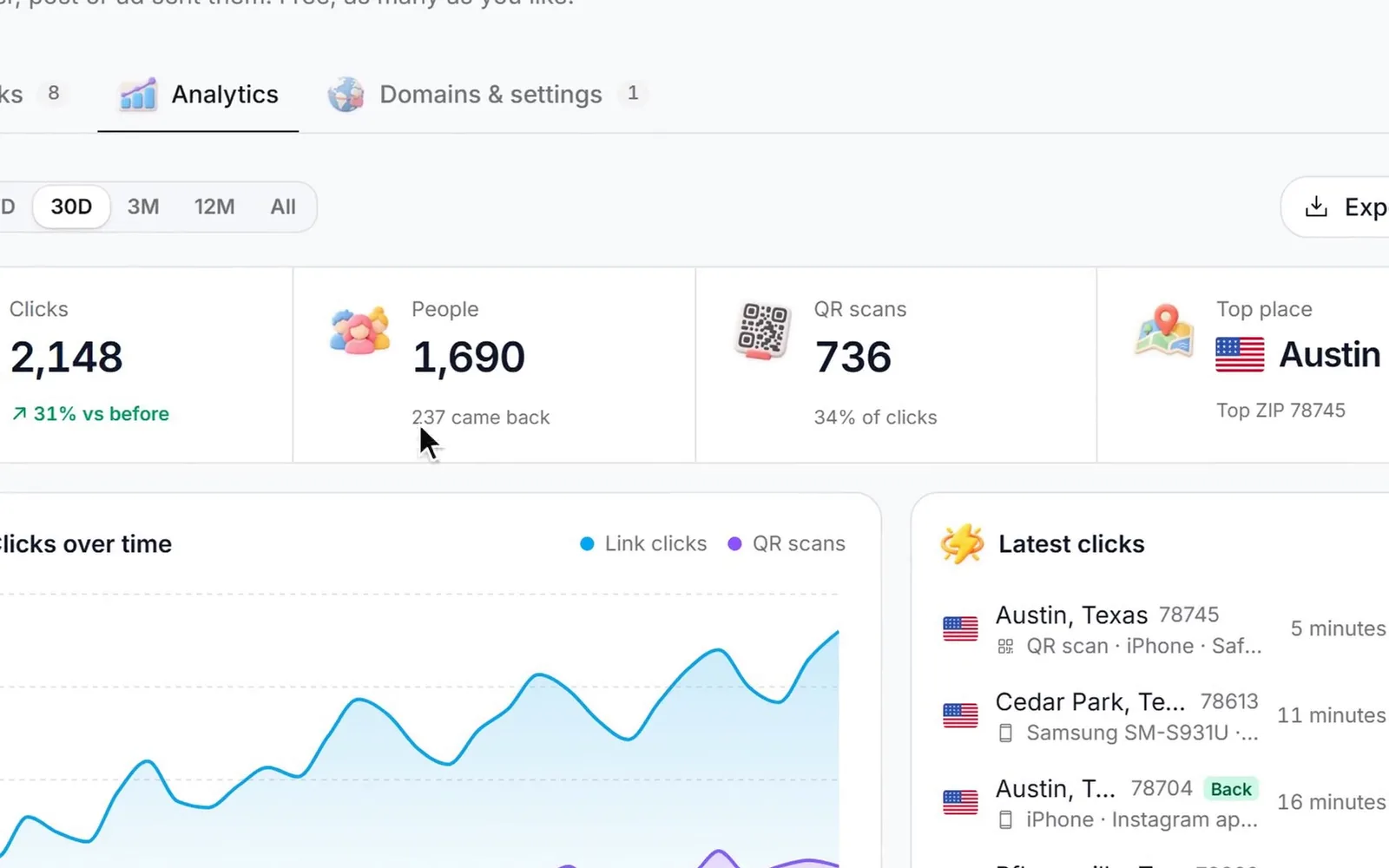
Clicks, scans, people and returning visitors. By country, state, city and ZIP code. By device, phone model, browser and system, with versions. By the site and the exact page they came from, their language and their network, the hour and the weekday. Tap any row and everything else filters to it.
 Clicks
2,148
+31% vs the 30 days before
 People
1,690
14% came back
QR scans
736
34% of all visits
Top place
Austin, TX
Top ZIP 78745
 Over time
Where
- AustinTX1,102
- Round RockTX214
- Cedar ParkTX168
- PflugervilleTX131
- GeorgetownTX96
 Devices
- iPhoneiOS 261,309
- Samsung GalaxyAndroid 16462
- WindowsChrome 142198
- MacSafari 26112
- Google PixelAndroid 1667
 Came from
- Facebook816
- QR code scans736
- Instagram241
- google.com172
- nextdoor.com109
As it happens
Watch the clicks land on the map.
Each click is a dot on a real street map and a line in the live feed: the city, the phone, the app it was opened in. Robots and the apps that fetch a link to draw its preview are spotted and never counted, so a text that shows a preview doesn't look like a visitor.
- Real people only: robots and previews left out
- Every click exported as a CSV
- IP addresses wiped after 90 days, and no cookies to count people
 Latest clicks
Smart links
One link, the right page for each person.
Send iPhones to the App Store and Android phones to Google Play, or open your Instagram profile right in the app. Send people from another country to their own page. Split visitors across up to four versions of a page to test which one works better, with every click marked by the version it got.
- iPhone and Android links, app links included
- Up to 30 country rules
- A/B split across up to four pages
Everyone else, split
Preview cards and pixels
Looks right in a text. Builds your audience.
Write the title, description and picture people see when the link is shared in a text, a post or a chat. Add your Meta Pixel, Google tag, TikTok Pixel or LinkedIn Insight Tag, and every click joins your retargeting audience, even when the link goes to a page you don't own.
In your control
Links that end when the offer does.
Give a link an end date or a click limit, and choose where late visitors go instead of a dead page. Put a password on it. Keep your short address in the address bar. Every page a visitor might see on the way, like the password screen, carries your business's name.
- End on a date, or after a number of clicks
- Send late visitors to another page
- Password-protect any link
- Keep the short address in the address bar

Whole campaigns
Two hundred links at once, named the same way.
Paste a list or drop a CSV of addresses, back-halves and names, give them shared tags and a saved UTM set, and get every short link back to copy, download or print. Then check every destination in one click: links whose page has stopped working are marked so you can fix them.
- 200 links a batch, on your default domain
- Saved UTM sets, so every campaign is tagged alike
- One click finds every broken destination
For agencies
Free for every client, however many you have.
Short Links is in every sub-account of your white-label CRM, on your domain, and never names the platform. Give every client the link shortener and QR code tool they'd otherwise pay for, at no cost to you, whether you run 3 sub-accounts or 300.
- Unlimited client sub-accounts from $99/mo
- Each client's links on your domain, or their own
- Ask the AI chat in plain words, or use the API and MCP
Switching
How to move your short links from Bitly or Rebrandly
If your old links use your own domain, they can move, and everything you printed keeps working. It takes about fifteen minutes.
- 1
Download your links
Get a list of your links from your current tool: each link's back-half and the address it goes to. Depending on the tool and your plan, that's a CSV export or its API.
- 2
Add your domain in Short Links
Under Domains, add the domain your old links use, and set its "link not found" page to your website. Short Links shows the one record the domain needs.
- 3
Point the domain here
Change the domain's record to that one, where you bought the domain. Once it shows as live, usually within minutes, make it the default.
- 4
Paste them in, back-halves kept
Create many links takes a line per link: the address, the old back-half and a name, up to 200 at a time. Your old links and printed QR codes now go where they always did, tracked here.
Good to know
- Do the last two steps back to back. In between, an old link opens your website instead of its page.
- With the API you can make the links on your domain before you switch it, so there's no gap at all.
- Links on bit.ly or rebrand.ly addresses can't move: those addresses belong to them. Make new links and swap them where you can.
- Click history stays with your old tool. Download it before you cancel.
Why Short Links & QR Codes
What it does for your business.
Know which flyer worked
Give each flyer, post, ad and yard sign its own link or code, and see which one brought people in.
Look like a real business
go.yourbusiness.com reads like you. A random string from a link shortener reads like spam.
Fix a printed mistake
Wrong page on 5,000 door hangers? Change where the link goes, and every printed code follows.
Never send people to a dead page
Check every destination in one click, and send ended offers somewhere useful.
Build your retargeting audience
Every click can join your Meta, Google, TikTok or LinkedIn audience, wherever the link points.
One less bill
Cancel the link shortener and the QR code generator. They're both already in Zuops, free.
Pricing
Free. Every feature, every plan, no link limit.
Every plan includes the whole platform. Usage comes out of your plan's monthly credits.
See plans and credit pricesFAQ
Short Links & QR Codes: common questions
The basics
Is the Zuops link shortener really free?
Yes. Short Links is part of every Zuops plan, from $19/mo, and costs nothing on top: no credits, no add-on, no per-link price and no ads on your links. Every feature on this page is included, including your own domain, QR code design, analytics and the API.
Is there a limit on links or clicks?
There's no monthly link limit and no click limit. Only to stop a runaway script, one account can make up to 2,000 new links a day, and 100,000 in all.
What web address do my short links use?
From day one, your CRM's own address with /l/ and the back-half, such as usezu.com/l/spring-sale, or your agency's domain if your CRM comes from an agency. Add your own domain, like go.yourbusiness.com, and links can use it instead, with no /l/.
Is Zuops a good Bitly alternative?
If you want branded links, QR codes and real click tracking without a monthly bill, yes. Bitly's free plan gives 5 links a month with ads, and a custom domain starts on its Growth plan at $348 a year. Zuops includes your own domain, unlimited QR codes, phone and country links, A/B tests and pixels on every plan. Bitly is a bigger standalone product with more integrations, so check that the ones you rely on are covered.
QR codes
How do I make a QR code that tracks scans?
Every short link has its own QR code. Open the link, design the code with your colours, logo and a framed call to action, and download it as PNG, SVG or PDF. Scans are counted apart from clicks, with the same detail: where, on what phone, and when.
Can I change where a QR code goes after I print it?
Yes. The code holds your short link, not the page. Edit the link's destination any time and every printed code goes to the new page. This is what people call a dynamic QR code, and there's no charge for it.
Tracking
What does it track for each click?
Country, state, city and ZIP code, a point on the map, device, phone model, browser and system with versions, language, the site and exact page the click came from, the network, the time, whether it was a click or a scan, which version of a split it got, and whether the person had been before. Any of these filters all the others.
Are robots and link previews counted as clicks?
No. When a link is pasted into a text, chat or post, the app fetches it to draw a preview, and search engines and other robots visit links too. Short Links recognises them, shows them the preview card, and leaves them out of every number.
What about privacy?
IP addresses are wiped after 90 days; the rest of each click's facts stay so your reports keep working. People are counted without cookies. Retargeting pixels only run on links you add them to.
Do short links hurt SEO?
Short links are for sharing, print and tracking. They redirect with a standard 302, and the short pages themselves are kept out of search results. On your own website, link to your pages directly.
Domains and switching
Can I use my own domain for branded short links?
Yes, at no cost. Add the domain in Short Links, then add the one CNAME record it shows where you bought the domain. It's verified and secured with HTTPS for you, and you can make it the default for every new link. Most people use a short subdomain like go.yourbusiness.com.
How do I move my links from Bitly or Rebrandly?
If they use your own domain, add that domain here, point it here, then paste your links in with their old back-halves, 200 at a time. Old links and printed QR codes keep working. Links on bit.ly or rebrand.ly addresses can't move, because those addresses are theirs. The guide on this page walks through it.
For agencies
Can my clients use it under my brand?
Yes. Short Links is in every sub-account of your white-label CRM, and their links use your domain unless they add their own. The platform's name never shows. It's free for every client, so you can include it in any package.
Is there an API?
Yes. The REST API makes, edits and lists links (100 at a time in bulk), reads stats and every click, and manages domains. The MCP server gives AI agents the same, and you can ask the Zuops chat to make a link and its QR code in plain words.
Still have a question?
Ask us. You get an answer in about a minute, and a person from the team takes over when needed.
Ask our teamSources, checked November 11, 2026
What this page says about Bitly, Rebrandly and Short.io comes from each company's own website (pricing, product and help pages), as it read on November 11, 2026. Prices and features change, so check each company's site for the latest before you decide. Which one fits better is our opinion. Bitly, Rebrandly and Short.io are trademarks of their owners, named only to identify the products compared. Zuops isn't affiliated with or endorsed by them. Spot something out of date? Tell us and we'll correct it.
Make your first tracked link.
Free in every Zuops account. Start on your CRM's address or bring your own domain.
- No link limit
- QR codes with your logo
- Every click tracked