Free digital loyalty cards
Loyalty cards that live in your customers' phones. Free.
Give every customer a stamp card, points, a membership or a gift card in Apple Wallet or Google Wallet. Put the QR code on your counter, scan their card with your phone to add a stamp, and their phone tells them when they've earned a reward. Loyalty apps charge $25 to $349 a month for this. In Zuops it's free, in every account and every client's sub-account.
Watch it work36 secFree on every plan. No app for your customers, no per-card fees, no limit on members.



Loved by 1,400+ businesses
See it in action
See Digital Loyalty Cards in action.
Recorded inside Zuops with a demo business. Nothing here is a mockup.
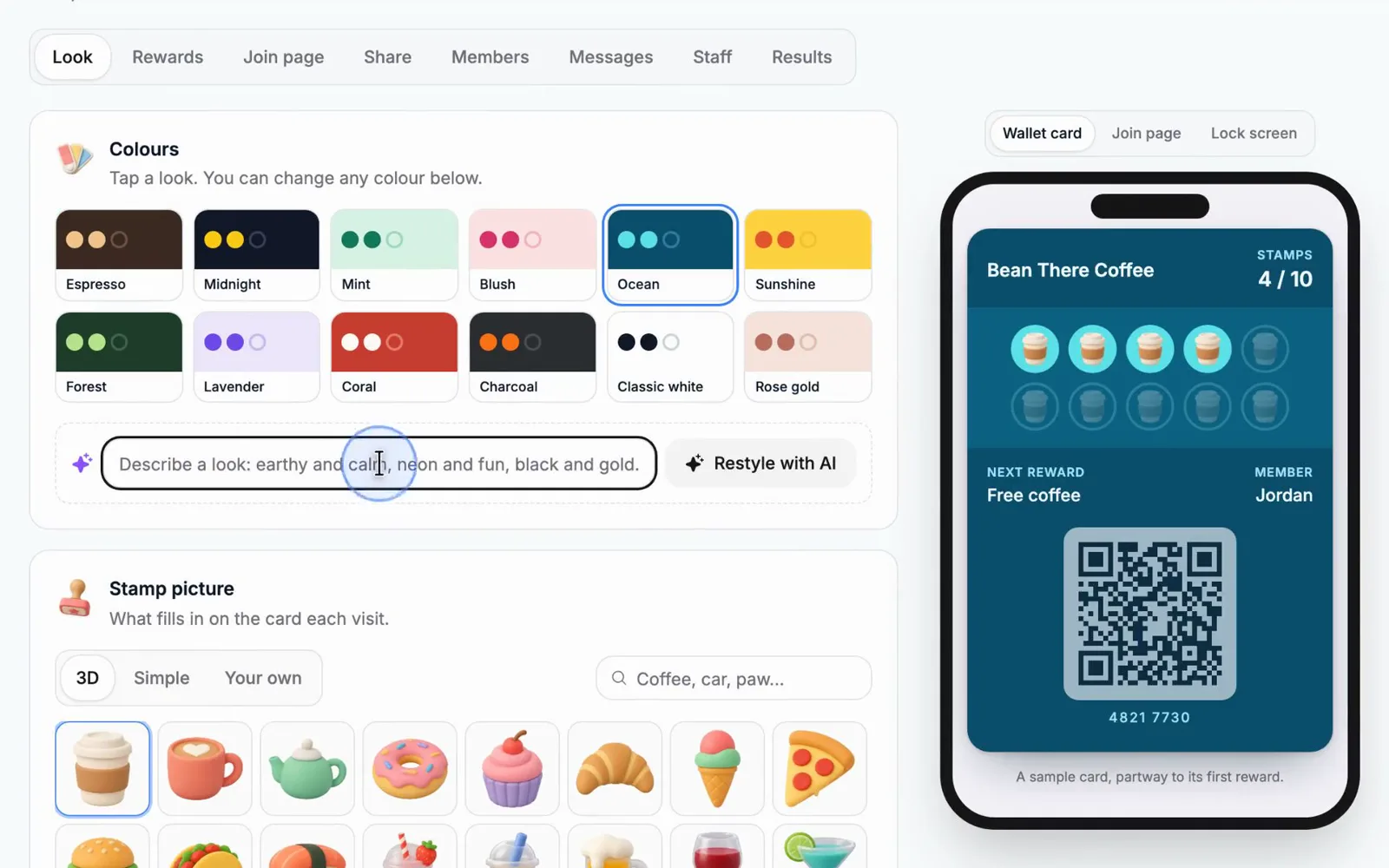
1/6 Start from a card like yours
How it works
Your card in front of customers today
- 01
Pick a card
Start from a card made for a business like yours, or describe your business in one line and AI designs it. Your logo is already on it.
- 02
Put the QR code out
Print the counter sign, text the card to customers already in your CRM, or let them scan a screen at the register. Joining takes about ten seconds.
- 03
Scan to stamp
Point your phone at their card and tap Add a stamp. Their card updates in their wallet, and a reward shows up on their lock screen.
Every kind of card
Nine kinds of loyalty card, all included.
A stamp card for coffee or car washes, points for every dollar, cashback credit, VIP levels, a members' pass, a pack of prepaid visits, a one-time coupon, a gift card or a ticket to your event. Every kind saves to Apple Wallet and Google Wallet, and you can run as many as you like.
Stamp card
Buy 9, get the 10th free. The classic punch card, in their phone.
Coffee, car washes, salons, lunch spots
Points
Points for every dollar they spend, traded for rewards you pick.
Restaurants, shops, auto repair
Cashback
A share of every purchase comes back as credit for next time.
Retail, home services, spas
VIP levels
Silver, Gold, Platinum: the more they spend, the bigger the perk.
Boutiques, gyms, regular-service businesses
Membership
A members-only pass with perks and an end date.
Car wash clubs, maintenance plans, VIP clubs
Visit pack
Visits paid up front (10 washes, 5 classes); each scan uses one.
Car washes, classes, dog walking, cleaning
Coupon
One offer saved in their wallet, used once at the counter.
First-visit offers, events, flyers

Gift card
A balance you load for them; each purchase takes it down.
Any business that sells gift cards
Event pass
A ticket in their wallet for your event; scan it to check them in.
Open houses, classes, tastings, launch parties
Compare
What digital loyalty cards cost elsewhere.
These are each company's own published prices, read on November 12, 2026, for their entry and top plans. Several charge per location, and extra card types or features can cost more. Prices change, so check theirs.
From placealive.com, boomerangme.com, loopyloyalty.com, stampme.com, loyalty.kangaroorewards.com and sumup.com pricing pages, read November 12, 2026. Prices in US dollars before tax; some are per location or billed yearly as noted. Prices and plans change, so check theirs before you decide. Zuops' account plans start at $99/mo; Loyalty Cards adds nothing to them.
Design
A card that looks like your business, in minutes.
Pick a colour set or use your brand colour, then change any colour on the card. Choose from 128 simple and 55 3D stamp pictures, or upload your own. Add your logo, a photo behind the stamps and your own words. You see exactly what your customers will see while you edit, and changes reach every card already in a wallet by themselves.
- 12 colour sets, your brand colour, every colour on its own
- 183 stamp pictures, or your own logo as the stamp
- A photo behind the stamps, your logo and name, 10 fonts
- Describe a look and AI restyles the card
Apple Wallet and Google Wallet
In their wallet, next to their credit cards.
Customers tap Add to Apple Wallet or Add to Google Wallet, and the card stays on their phone with no app to download. It updates the moment you add a stamp. iPhone can show it on the lock screen when they're near your shop, ready to scan. Without a wallet, the same card works as a web page they can save to their home screen.
- No app to download, on iPhone or Android
- Updates live after every stamp
- On the lock screen near your shop (iPhone)
In Apple Wallet: updates after every stamp
Scan to stamp
Any phone is the scanner.
Open the card's scanner in the CRM, point the camera at a customer's card and press the one big button: add a stamp, add a purchase, use a visit, charge a gift card or check in. Rewards that are ready show right there to use. No camera handy? Type the 8-digit member number or search by name or phone.
- Works in the phone's browser, no app
- Rewards ready to use show as soon as you scan
- Undo a stamp from the last 24 hours
Stamps that add themselves
Paid invoice? The stamp is already on.
Turn it on and a customer's card earns by itself when an invoice is paid, a job is marked won, an appointment is done or a Stripe payment comes in. For service businesses that never meet customers at a counter, that's the whole loyalty program, running on its own. Customers who pay and don't have a card yet can get one sent to them.
- Paid invoices, won jobs, finished appointments, Stripe payments
- Points and cashback follow the amount paid
- Never counted twice for the same invoice
 Stamps that add themselves
Lock-screen notes
Bring them back with a note on their lock screen.
When a customer earns a reward, is one stamp away, has a birthday or hasn't been in for a while, their phone shows a note from you on the lock screen. You can also send every card holder a note yourself, like double stamps this weekend. Notes through Wallet cost nothing, unlike texts.
- Rewards earned, one stamp to go, birthdays, win-backs
- Your own notes to everyone or a group, once a day at most
- Optional text for people whose card isn't in a wallet
9:41
Saturday, November 15
Just 1 more to a free coffee at Bean There.
Happy birthday, Jordan! Bean There has a gift for you: a free pastry.
Double stamps all weekend! Show your card at the counter.
Get customers on it
Every way to join, from the counter to their texts.
Print the counter sign or table cards with your QR code. Text or email every past customer their own card, already filled in, so one tap adds it to their wallet. Put a tablet by the register that shows a code customers scan to stamp their own card. Each card also gets a link to send a friend, and the friend who sent them is thanked after the new friend's first visit.
The counter sign
Print it, tape it up. Customers scan with their camera and join in ten seconds.
Their own card, by text
Every past customer gets a card already filled in. One tap adds it to the wallet.
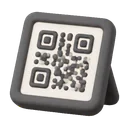
A self-stamp screen
A tablet by the register shows a code that changes every 30 seconds.
Your staff
A staff page with a PIN for each person.
Staff who don't use the CRM open a staff link on any phone or tablet and type their own PIN. They can scan cards, give a new customer a card and use rewards, and every stamp says who gave it. A daily limit per card stops a cashier from giving away a card's worth of rewards.
Bean There
Type your PIN
Every stamp says who gave it
Results
See what the card brings back.
Members, how many keep the card in a wallet, visits, rewards used and how many customers came back, with a 30-day chart and your best customers. Every card's full history is one tap away, and every member exports to a spreadsheet.
For agencies
A loyalty program for every client, at no cost to you.
Loyalty Cards is in every sub-account of your white-label CRM. The cards, the join pages and every text carry your client's business and never name the platform. It's free by default, or sell it as an add-on at your own price, monthly or in credits, from Plans & add-ons.
Greenline Lawn's sub-account
Happy Tails's sub-account
Studio 9's sub-account
Switching
How to move your loyalty members from another app
Customers keep their stamps and points. It takes about ten minutes.
- 1
Export your members
Download a spreadsheet of your members from your current loyalty app: name, phone or email, and their stamps, points or balance.
- 2
Make the same card here
Pick the same kind of card (stamps, points, cashback...) and set the same rewards, so nobody's balance changes meaning.
- 3
Import them
Members > Import reads the spreadsheet's columns for you. Each person gets their card with their balance, saved as a customer. Nothing is sent yet.
- 4
Send them their cards
Send cards > Imported, not sent texts or emails each person their own card, a few at a time. One tap adds it to their wallet.
Why Digital Loyalty Cards
Why a card in their phone works
Never lost, never forgotten
A paper punch card ends up in the wash. A wallet card is on the phone they carry everywhere.
A reason to come back
One stamp away, a birthday gift or a reward about to run out reaches their lock screen at the right moment.
Know your regulars
Every visit is on a customer's record in your CRM, so you know who comes back and who went quiet.
No new app, no new bill
Customers don't download anything, and you don't pay another monthly subscription.
Fraud-proof stamping
Daily limits, staff PINs, codes that change every 30 seconds and a history of every stamp.
Works for service businesses too
Stamps can add themselves when an invoice is paid, so a plumber or a cleaner gets loyalty without a counter.
Pricing
Digital loyalty cards are free in Zuops, for every client.
Every plan includes the whole platform. Usage comes out of your plan's monthly credits.
See plans and credit pricesFAQ
Digital Loyalty Cards: common questions
Is the digital loyalty card really free?
Yes. Loyalty Cards is included in every Zuops account and every client sub-account, with no per-card or per-member fee and no limit on members. Wallet notes are free too. The only cost is the usual text price if you choose to text cards or notes, and texting is optional.
Do my customers need to download an app?
No. They add the card to Apple Wallet or Google Wallet, which are already on their phone. Without a wallet, the same card works as a web page they can save to their home screen.
How do I add stamps?
Scan the QR code on the customer's card with your phone in the CRM or on the staff page, then press Add a stamp. You can also type the card's 8-digit member number or search by name or phone. Or let stamps add themselves when an invoice is paid, a job is won or an appointment is done.
Can customers stamp their own card?
Yes, with the counter screen: a tablet by the register shows a code that changes every 30 seconds. Customers scan it to get their stamp, so a photo of the code doesn't work from home, and each card can only do it once every ten minutes and within your daily limit.
What kinds of loyalty cards can I make?
Stamp cards, points, cashback, VIP levels, memberships, visit packs (like 10 car washes), coupons, gift cards and event passes. You can run several at once.
Can I send push notifications to card holders?
Yes. When a card is in Apple Wallet or Google Wallet, a note from you shows on the customer's lock screen: a reward earned, one stamp to go, a birthday gift, a win-back offer or your own message. Your own messages go out once a day at most, so customers keep notifications on.
Can I move my members from Loopy Loyalty, Boomerangme or another app?
Yes. Export a spreadsheet from your current app and import it in Members > Import: each person gets their card with their stamps, points or balance. Then send them their cards by text or email.
Can I reward customers for reviews?
No. Rewarding reviews breaks Google's rules and the FTC's rule on review incentives, so Loyalty Cards refuses review wording in rewards and messages. Reward visits and purchases instead, and ask for reviews separately with Review Requests.
Can my agency resell it to clients?
Yes. It's in every sub-account of your white-label CRM, with your client's business on every card and page. It's free by default, or you can sell it as an add-on at your own monthly price or in credits.
Is there an API?
Yes: /v1/loyalty-cards, /v1/loyalty-members and /v1/loyalty-rewards make and change cards, add stamps and purchases from your point of sale (with your order id, so nothing counts twice) and use rewards, and the MCP tool loyalty_cards lets ChatGPT and Claude do the same.
Still have a question?
Ask us. You get an answer in about a minute, and a person from the team takes over when needed.
Ask our teamSources, checked November 12, 2026
- Place Alive pricing
- Boomerangme pricing
- Loopy Loyalty pricing
- Stamp Me pricing
- Kangaroo Rewards pricing
- SumUp loyalty pricing
What this page says about Place Alive, Boomerangme, Loopy Loyalty, Stamp Me, Kangaroo Rewards and SumUp comes from each company's own website (pricing, product and help pages), as it read on November 12, 2026. Prices and features change, so check each company's site for the latest before you decide. Which one fits better is our opinion. Place Alive, Boomerangme, Loopy Loyalty, Stamp Me, Kangaroo Rewards and SumUp are trademarks of their owners, named only to identify the products compared. Zuops isn't affiliated with or endorsed by them. Spot something out of date? Tell us and we'll correct it.
Give your customers a reason to come back
Start a free digital loyalty card in your account today.
- Free in every account
- Apple Wallet and Google Wallet
- Set up in minutes