Webinars & Events
Webinars and events that run themselves.
A sign-up page with times in each visitor's own time zone, reminders by text and email, a room that plays your recording on schedule or opens your Zoom, an offer button at the minute you pick, and the right follow-up for people who came and people who didn't. Everyone lands in your CRM with what they watched.
Watch it work5 minIncluded on every plan, with no fee per webinar or per attendee. Reminder texts are 0.125 credits and emails 0.03, like any message you send.



Loved by 1,500+ businesses

See it in action
See Webinars & Events in action.
Recorded inside Zuops with a demo business. Nothing here is a mockup.
1/11 Intro
How it works
Live in a few minutes
- 01
Start from a ready-made webinar
A solar info session, a med spa VIP night, a retirement workshop or a home-buyer seminar, with its times, page, room and messages filled in. Or type a few lines and Write it for me writes the page, the offer and a poll.
- 02
Add your video, link or address
Paste a YouTube, Vimeo, Loom or Wistia link or upload the recording. Going live? Connect Zoom or paste a Meet or Teams link. In person? Add the address and the seats.
- 03
Pick the times and go live
Every week, once a month, set dates or Watch now. Share the link, the QR code or a ready-made post, or put the sign-up on your website.
Three kinds of event
Recorded on a schedule, live, or in person.
Run a recording that plays at set times like a TV show, a live session on Zoom, Google Meet or a stream, or a seminar in a real room with seats and tickets. Each one gets the same sign-up page, reminders, follow-ups and results.

Recorded, on a schedule
Plays at your set times like a TV show, or the moment someone signs up. People who come late join where it is.
Okafor Solar · Solar 101
Every Tuesday and Thursday at 7:00 PM, plus starts every 30 minutes from 9:00 AM to 8:00 PM and watch now

Live on Zoom, Meet or a stream
A Zoom meeting is made on your account for each date, or use any meeting link, or stream YouTube or Vimeo Live inside the room.
Rivera Med Spa · VIP Night
It's live now
It's on Zoom. The button opens it in a new tab.
Join now
In person, with tickets
An address, seats for each time, and a ticket with a QR code that your team checks at the door.
Brennan Realty · Home buyer seminar
Sat, Dec 12
10:00 AM · 4 left
Sat, Dec 19
Full
The sign-up page
Dates that keep themselves up to date.
Set the schedule once: every Tuesday and Thursday at 7, the first Thursday of the month, a list of dates, or a new start every 30 minutes. The page always shows the next few times, in the visitor's own time zone, with the soonest marked and Watch now if you want it. Past dates and holidays you skip never show.
- Name, email and mobile. Nothing more unless you add a question
- The texting box is never ticked for them and never required
- It's a Smart Form: your domain, embeds and Meta pixel work as usual
Okafor Solar is in Tampa. Maria opened the page in Austin, so every time shows in Central time.
Before it starts
One link, a waiting room and a real countdown.
Everyone gets their own link by email, and by text when they said yes. The confirmation email carries the calendar invite. The link opens a waiting room 15 minutes early with a countdown, what they'll learn and Add to calendar, then takes them in by itself when it starts.
- Can't make it? They pick another time themselves
- Late? They join where it is, or start from the beginning
- The same link holds the replay afterwards
The room
Your offer, at the minute you pick.
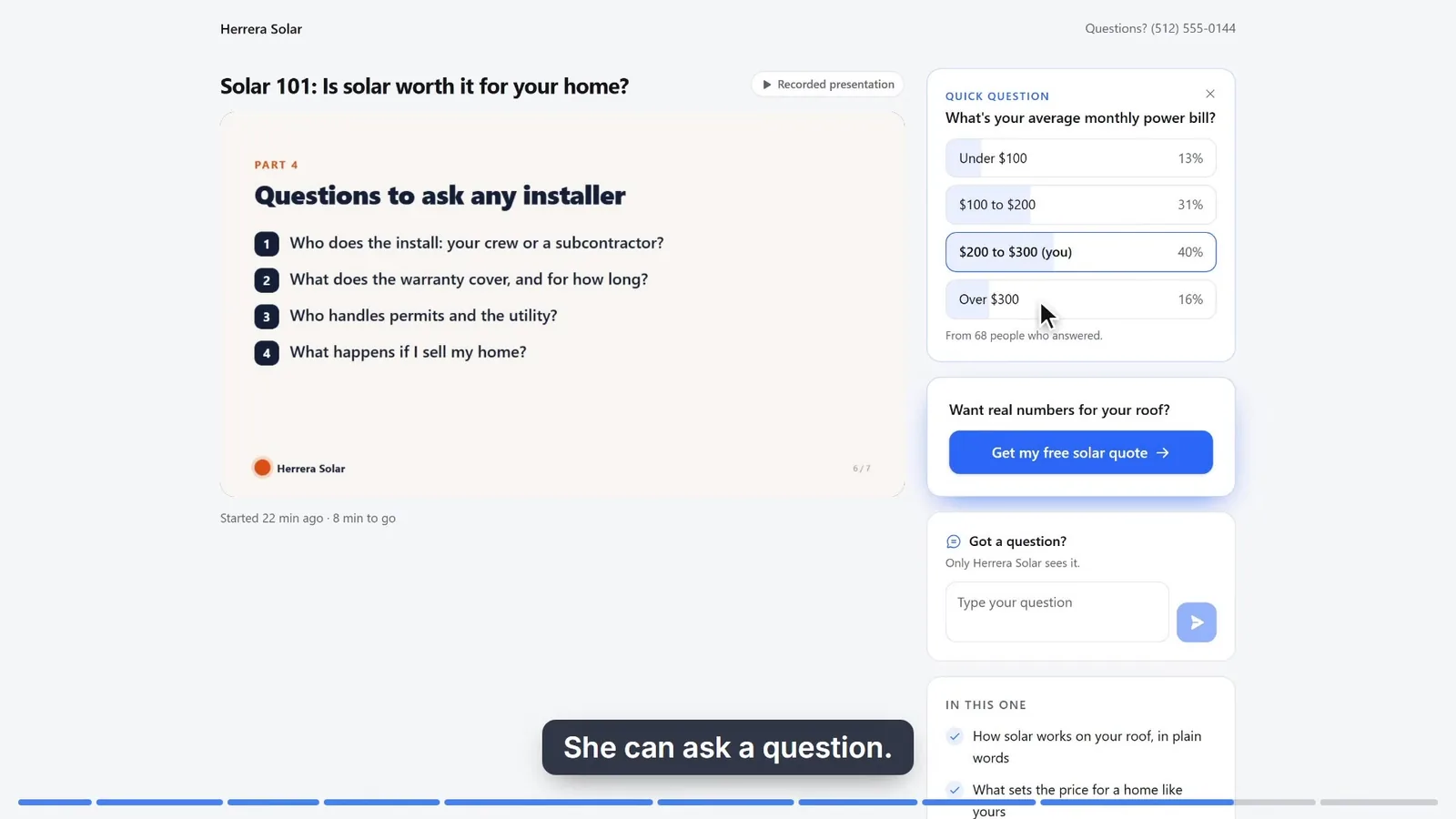
A recording plays at the same point for everyone, with no skipping ahead. Polls show at their second, questions land in your Messages with an instant answer from your AI Brain if you want one, and the offer button appears when you get to it: book a call, a quote form or any page.
- It says "Recorded presentation", never a fake LIVE badge
- No made-up viewer counts, chat or "seats left"
- Handouts: a checklist, the slides, a price sheet
Reminders and follow-ups
The right message for who came, who left early and who missed it.
Eight messages are written for you, by text and email. Before: right away, the day before, an hour before and when it starts. After: thanks and your offer for people who came, the part they missed for people who left before the offer, the replay for people who didn't come, and a last chance before the replay closes.
- Texts go only to people who ticked the box, and STOP always works
- Nobody gets "we're starting" when they're already in
- Reminders go on time; follow-ups wait for your sending hours
In person
Seminars and VIP nights, with a ticket at the door.
For an event in a real place, the page shows the address and the seats left for each time, and marks a time Full when it is. Each person's link is their ticket with a QR code. Scan it at the door with your phone's camera, or find them by name.
- Someone cancels, and the first person on the waitlist gets the seat and their link
- Seats left only shows when you set a real limit
- Times stay in the event's own time zone
Results
From page view to booked, and who came on every lead.
See how many saw the page, signed up, came, stayed to the offer, clicked it and booked after, for every time or one date. The drop-off line shows where people stopped watching, with your offer marked. Every person's lead shows what they watched, their poll answers and whether they clicked.
- Automations start when someone signs up, comes, misses it or clicks the offer
- Facebook form leads can get a seat at your next webinar by themselves
- A Webinars source in Reports, plus webhooks and the API
Maria Castillo · Webinars & events
Solar 101: Is solar worth it for your home?
Came · watched 94%
What's your average monthly power bill? $200 to $300
Example data for a made-up business, not a typical or promised result.
Compare
Zuops vs WebinarJam, EverWebinar and eWebinar.
Webinar tools are a monthly plan of their own, on top of your CRM. In Zuops, webinars are part of the CRM your leads are already in, and texts cost what any text costs. Their prices below are from their own pricing pages, read November 26, 2026.
WebinarJam
Live webinars; automated ones through EverWebinar
$49a month
Starter, billed monthly. $39 billed yearly.
- Attendees
- 100 on Starter, 500 on Basic ($99 a month)
- Recorded webinars
- “EverWebinar is included in the Basic, Professional, and Enterprise packages”
- Texts
- Lists an “Email & SMS system”, with no text price
EverWebinar
Automated webinars
$199a month
Month-to-month. $99 a month billed yearly ($1,188).
- Attendees
- No limit stated on the pricing page
- Texts
- Lists “optional SMS reminders”, with no text price
- Trial
- $1 for 14 days, then $199 a month
eWebinar
Automated webinars
$99a month
Level 1, billed monthly. $1,010 billed yearly.
- Sign-ups
- 1,000 registrants a month on Level 1 (5,000 on Level 3, $299 a month)
- Texts
- Not on its pricing page
- Trial
- 14 days free
Zuops Webinars & Events
Built into your CRM
$0extra
In every plan and every client's sub-account.
- Plan of its own
- None: on every plan, from $19/mo
- Sign-ups
- No limit
- Texts
- Built in: 0.125 credits a text, 0.03 an email
- In person
- Seats, tickets and check-in at the door
- Who came
- On the lead in your CRM, with what they watched
From webinarjam.com/pricing, everwebinar.com/pricing and ewebinar.com/pricing, read November 26, 2026. Quotes are their own words. WebinarJam and EverWebinar list a $1 trial for 14 days, eWebinar a 14-day free trial. Zuops' texts and emails are the usual messaging credits. Plans and prices change; check theirs before you decide.
Why Webinars & Events
Why businesses run their webinars on Zuops.
Always the next date
Times move forward by themselves. No page to edit each week.
Their time zone, not yours
Every visitor sees times in their own zone, with the zone named.
A room that runs itself
The recording plays on time and questions reach your Messages.
Follow-up that fits
Came, left early or missed it: each person gets the right message.
See who's ready to buy
What they watched and who clicked the offer, on every lead.
No webinar bill
Included on every plan, with no fee per attendee.
Pricing
Included on every plan. Reminder texts are 0.125 credits and emails 0.03.
Every plan includes the whole platform. Usage comes out of your plan's monthly credits.
See plans and credit pricesFAQ
Webinars & Events: common questions
The basics
How many people can sign up?
Zuops puts no limit on sign-ups. A recording plays on your page from YouTube, Vimeo, Loom, Wistia or your own upload (up to 500 MB; for a big audience, an unlisted YouTube or Vimeo link is best). A live session on Zoom or Google Meet holds as many people as your meeting plan allows, and in person you set the seats for each time.
Do I need Zoom?
No. A recorded webinar plays right on the page, and a live one can be a YouTube or Vimeo stream inside the room, a Google Meet or Teams link, or any meeting link. If you connect your Zoom, a meeting is made on your account for each date as soon as someone signs up for it, and each person gets that date's link.
Is a recorded webinar shown as live?
No. It plays at your set times at the same point for everyone, like a TV show, and the room says "Recorded presentation". There are no made-up viewer counts, fake chat or fake "seats left". Someone who comes late joins where it is or starts from the beginning.
Can I run an event in person?
Yes. Add the address, notes like parking, and the seats for each time. When a time fills up, the page marks it Full, and if someone cancels, the first person on its waitlist gets the seat and their link. Each link is a ticket with a QR code that your team scans at the door from a phone, or finds by name.
Messages
Do reminders go out by text?
Yes, by text and email from your business: right away, the day before, an hour before and when it starts, then the follow-up that fits each person. Texts only go to people who ticked the texting box on the sign-up page, STOP always works, and each message is skipped for people it doesn't fit.
Is there a replay?
Yes, on the same link, for 48 hours after it ends unless you pick 24 hours, 72 hours or a week. It opens where they stopped. People who didn't come get the replay in their follow-up, and a last-chance message 6 hours before it closes. After that, their link offers the next time in one tap.
Price
What does it cost?
Webinars & Events is included on every Zuops plan, from $19/mo, with no fee per webinar or per attendee. The reminders and follow-ups cost what any message costs: 0.125 credits a text and 0.03 credits an email. Write it for me and the instant answers in the room use no credits.
Is it a WebinarJam or EverWebinar alternative?
For local businesses, yes: recorded webinars on a schedule, live sessions, sign-up pages, reminders, an offer button and replays. WebinarJam's pricing page lists Starter at $49 a month billed monthly with 100 attendees and includes EverWebinar from Basic at $99; EverWebinar lists $199 a month month-to-month or $99 a month billed yearly (read November 26, 2026). In Zuops it's part of your CRM, with no plan of its own.
For agencies
Can my clients use it under my brand?
Yes. Webinars & Events is in every sub-account of your white-label CRM. Sign-up pages, links and emails carry your client's business name, never ours, on your domain or theirs. You can turn it off for any client in their access settings, and the API and MCP work across all your clients.
Still have a question?
Ask us. You get an answer in about a minute, and a person from the team takes over when needed.
Ask our teamSources, checked November 26, 2026
What this page says about WebinarJam, EverWebinar and eWebinar comes from each company's own website (pricing, product and help pages), as it read on November 26, 2026. Prices and features change, so check each company's site for the latest before you decide. Which one fits better is our opinion. WebinarJam, EverWebinar and eWebinar are trademarks of their owners, named only to identify the products compared. Zuops isn't affiliated with or endorsed by them. Spot something out of date? Tell us and we'll correct it.



Run your next webinar on autopilot.
Start from a ready-made webinar, add your video and share the link. Sign-ups, reminders and follow-ups run by themselves.
- Recorded, live or in person
- Text and email reminders
- Who came, on every lead